 Gnuke
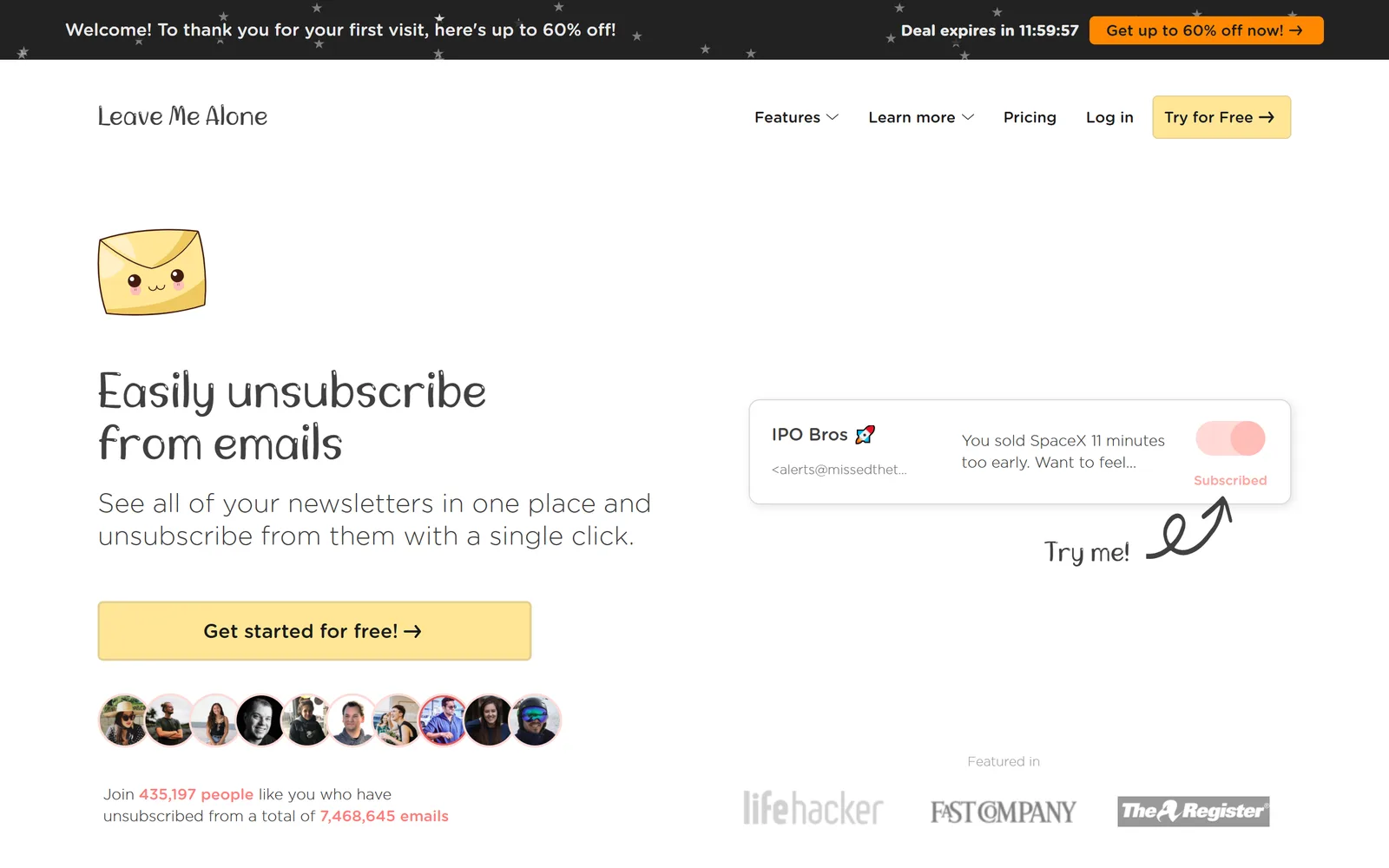
 Leave Me Alone is an unsubscribe service for almost any mailbox:
 Gmail,
 Outlook,
 Yahoo,
 iCloud and any IMAP account, through a web app and an
 Android app.
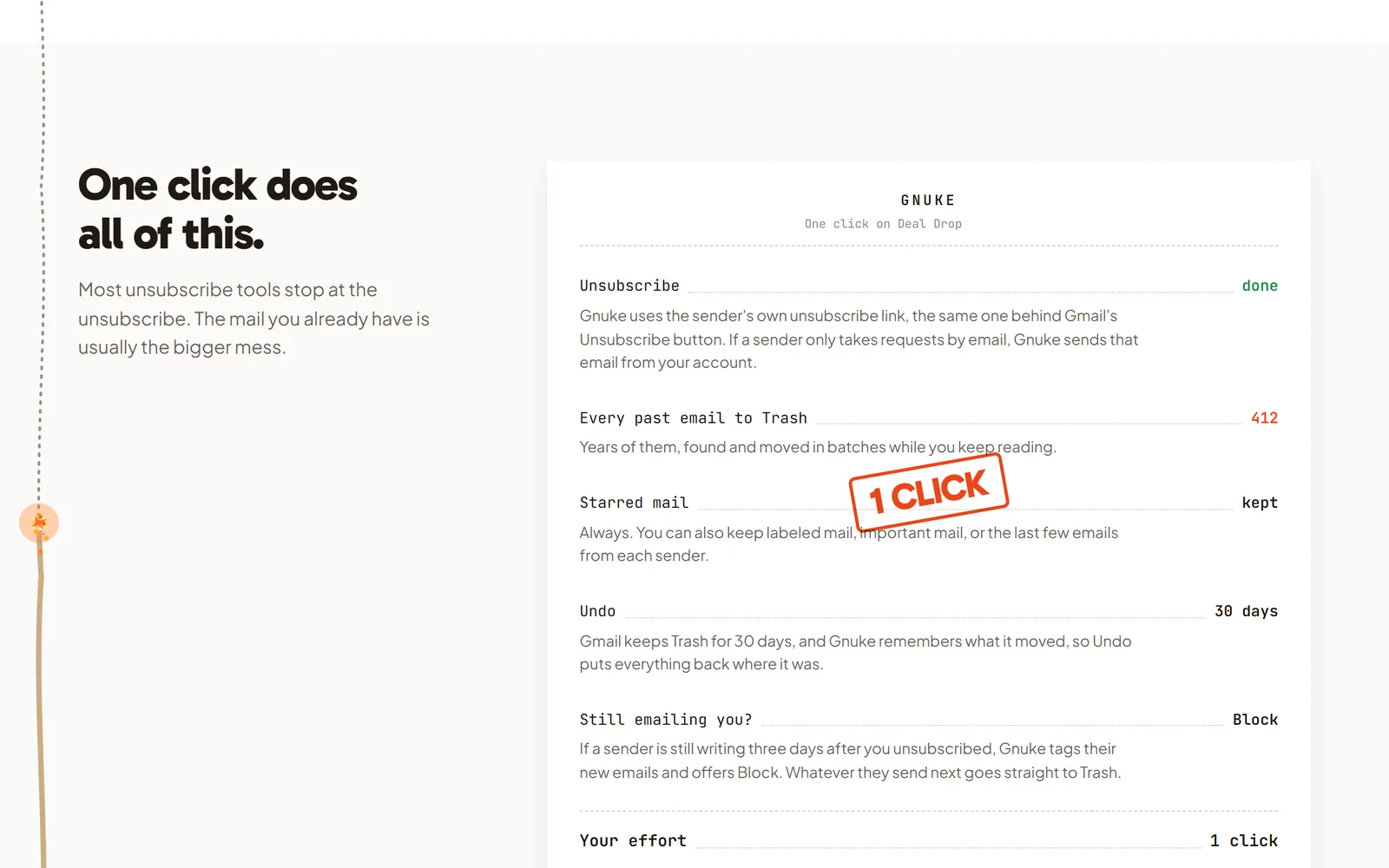
 Gnuke only works with Gmail, and in return it does more per click. One tap on a sender unsubscribes you and moves everything they ever sent to Trash, with Undo for 30 days, and nothing passes through a Gnuke server.
The short version#
Leave Me Alone finds your subscription emails, shows them in a list, and unsubscribes you from the ones you pick. It also sells extras: Rollups that bundle newsletters into one digest, a Screener that holds new senders until you approve them, a Spam Blocker, and Private Emails. Its servers do the work, and you pay for the larger plans by the month or the year.
Gnuke has fewer moving parts. You see a sender in Gmail, tap, and you're unsubscribed with every email from that sender in Trash. Then it keeps going: Block sends a sender's future mail straight to Trash, and on Unlimited, auto cleanup runs on a schedule and clears old newsletters and promos plus anything new from senders you already nuked. The trade is mailbox support. Gnuke is Gmail only.
Side by side#
| Gnuke | Leave Me Alone | |
|---|---|---|
| Main job | GnukeUnsubscribe from a sender and clear their whole history in one tap, then keep Gmail clear with Block and scheduled auto cleanup | Leave Me AloneUnsubscribe from lists, plus Rollups, Screener, Spam Blocker, Private Emails and Do-not-disturb (pricing) |
| Email providers | GnukeGmail | Leave Me AloneGmail and Google Workspace, Outlook and other Microsoft mailboxes, Yahoo, iCloud, AOL, Fastmail and any IMAP account. Not ProtonMail (providers, help) |
| Platforms | GnukeChrome extension for Gmail on a computer, plus a phone app | Leave Me AloneWeb app and an Android app. Its Apps page says an iOS app is coming. It mentions no browser extension |
| Unsubscribing | GnukeOne-click request when the sender supports it, otherwise an unsubscribe email from your address, otherwise opens the sender's page | Leave Me AloneFollows the sender's unsubscribe link, otherwise emails the sender from a unique address (FAQ). An AI agent works through unsubscribe pages that need a form, with screenshots as proof (policy) |
| Mail you already have | GnukeEvery email a sender ever sent goes to Trash in the same click | Leave Me AloneLeft in place by default (FAQ). A setting moves mail from unsubscribed senders to Trash or a folder in bulk, which can take hours (help) |
| New mail | GnukeBlock sends a sender's future mail to Trash with a Gmail filter. Auto cleanup (Unlimited) clears old newsletters and promos on a schedule, plus new mail from senders you already nuked | Leave Me AloneCreates Gmail filters for senders it can't unsubscribe from (policy). Screener and Spam Blocker filter new mail, depending on plan |
| Undo | Gnuke30 days, nothing deleted permanently. Starred mail always stays | Leave Me AloneUndo reverses its follow-up actions such as filters and blocklist entries. It can't re-subscribe you (help) |
| Where your mail is processed | GnukeIn your browser or on your phone. No Gnuke server sees your mail | Leave Me AloneOn its servers, hosted on DigitalOcean (policy) |
| Price | GnukeFirst 10 nukes free, every feature but auto cleanup. Unlimited is $29.99 a year or $4.99 a month, for up to 3 Gmail accounts | Leave Me AloneFirst 10 unsubscribes free. Seven Day Pass $19 once. Casual Emailer (4 accounts) $9 a month or $90 a year. Inbox Zero Hero (unlimited accounts) $16 a month or $160 a year. 14-day money-back guarantee (pricing) |
| Data practices | GnukeNothing sold. No Gnuke server sees your mail | Leave Me AloneSays it doesn't sell data. Optional features read message content, and it uses Mixpanel and Datadog analytics (policy) |
| Track record | GnukeNew | Leave Me AloneAbout 7 years (ethics), 4.9 stars from 99 reviews on Trustpilot |
We checked this table on October 23, 2026, against Leave Me Alone's home page, pricing page, FAQ, help center, privacy policy, terms and  Google Play listing. Plans and features change.
The real differences#
Which mailboxes each one covers#
This is Leave Me Alone's biggest advantage. It connects to Gmail and Google Workspace, Outlook, Office 365, Live and Hotmail, Yahoo, iCloud,  AOL, Fastmail and any other IMAP mailbox (providers). Its FAQ says ProtonMail can't connect, because the mail is encrypted on your device. If your mail is spread across several providers, one account there covers all of them. Gnuke is Gmail only, and the extension works on Gmail in
 Chrome plus the phone app.
What happens to the mail you already have#
Leave Me Alone's FAQ says an unsubscribe will "unsubscribe you instantly from the lists and don't move them to trash or apply any labels." Old messages stay in your inbox unless you ask for more. Its help center describes a setting under settings, then unsubscriber, that moves mail from senders you've unsubscribed from to your provider's Trash or a folder, using a "move all unsubscribed mail" action. It warns this can take several hours and that your provider may empty Trash on its own. Its privacy policy adds that it cannot delete your mail, only view and modify it.
Gnuke does the cleanup in the same click. Nuking a sender unsubscribes you, then moves every email they ever sent to Trash. Clean up lists newsletter and promo senders ranked by how much they send and how often you open them, with an estimate of the storage each takes, and you can nuke several at once.
Undo and what stays#
Leave Me Alone's undo button reverses the actions it takes after an unsubscribe, such as filters and blocklist entries. It can't put you back on a list, so rejoining means going to the sender's own site (help center). Its help center's description of the bulk move mentions no exception for starred or important mail.
Gnuke records what it moved, and Undo puts it all back for 30 days. Starred mail always stays, and you can also keep labeled mail, important mail, or a sender's newest 1, 3 or 10 emails. Senders you "always keep" are never offered for nuking.
Where your mail is processed#
Leave Me Alone runs on its own servers. Its privacy policy says it fetches your mail data from your provider, that "everything we store sits on DigitalOcean, including some storage in the United States," and that records are encrypted at rest. For Gmail it asks for the gmail.modify scope, which can view and modify but not delete mail, and a settings scope it uses to create filters.
Gnuke has no such server. It talks to Gmail straight from your browser or phone, so nobody at Gnuke can see your inbox. Gnuke's own servers hold only what runs the plan (your email address, to check for Unlimited, and your nuke count), never your mail. Details are in the privacy policy.
What Leave Me Alone says about your data#
Leave Me Alone's policy is detailed and dated, and it links its older versions. It says "We don't sell user data," lists every company that receives data, and says deleting your account removes your mail data and connected accounts right away. A copy of the user record stays for 3 days, and encrypted backups stay up to 90 days.
Its other public statements don't all match the policy, though:
- Its FAQ says "We never read the content of any of your emails but we do have access to some metadata."
- Its policy says Rollups fetch and store the content of mail from the senders you add, and removes it three months after the Rollup is sent. The Spam Blocker is off until you turn it on, but when it's on it "needs the body text of the emails." The policy says the company keeps samples of that mail, encrypted, to train its own classifiers, and that a truncated part of the content goes to an open-weight AI model hosted on DigitalOcean. Samples collected before you delete your account are deleted when their rolling window ends, not at once.
- Its Google Play listing says "No tracking, no analytics, no advertisements." The policy lists Mixpanel for product analytics, Datadog for monitoring (including usage data from the Android app), and a Google Ads purchase signal that includes a SHA-256 hash of your email address.
The content-reading features are opt-in, and the policy discloses all of it. What's missing is the same candor in the FAQ and the store listing. If you use only the unsubscribe list, the policy says it stores sender and recipient addresses, not message content.
Who runs it, and is it still around#
Yes. Leave Me Alone is run by Squarecat OÜ, a company registered in Estonia (terms). Its About page says it's built by two independent founders "without funding or outside support," and its ethics page says it has been operating for 7 years. Its home page counts 435,197 people and 7,468,645 emails unsubscribed.
It's active: its privacy policy was updated August 8, 2026, its blog has a post from October 4, 2026, and its Android app was updated April 15, 2026. We searched for news of a sale, a shutdown or an open-source release and found none. Its ethics page says it's "built on open source," meaning it uses open-source tools, and we found no public repository for the product itself.
What it costs#
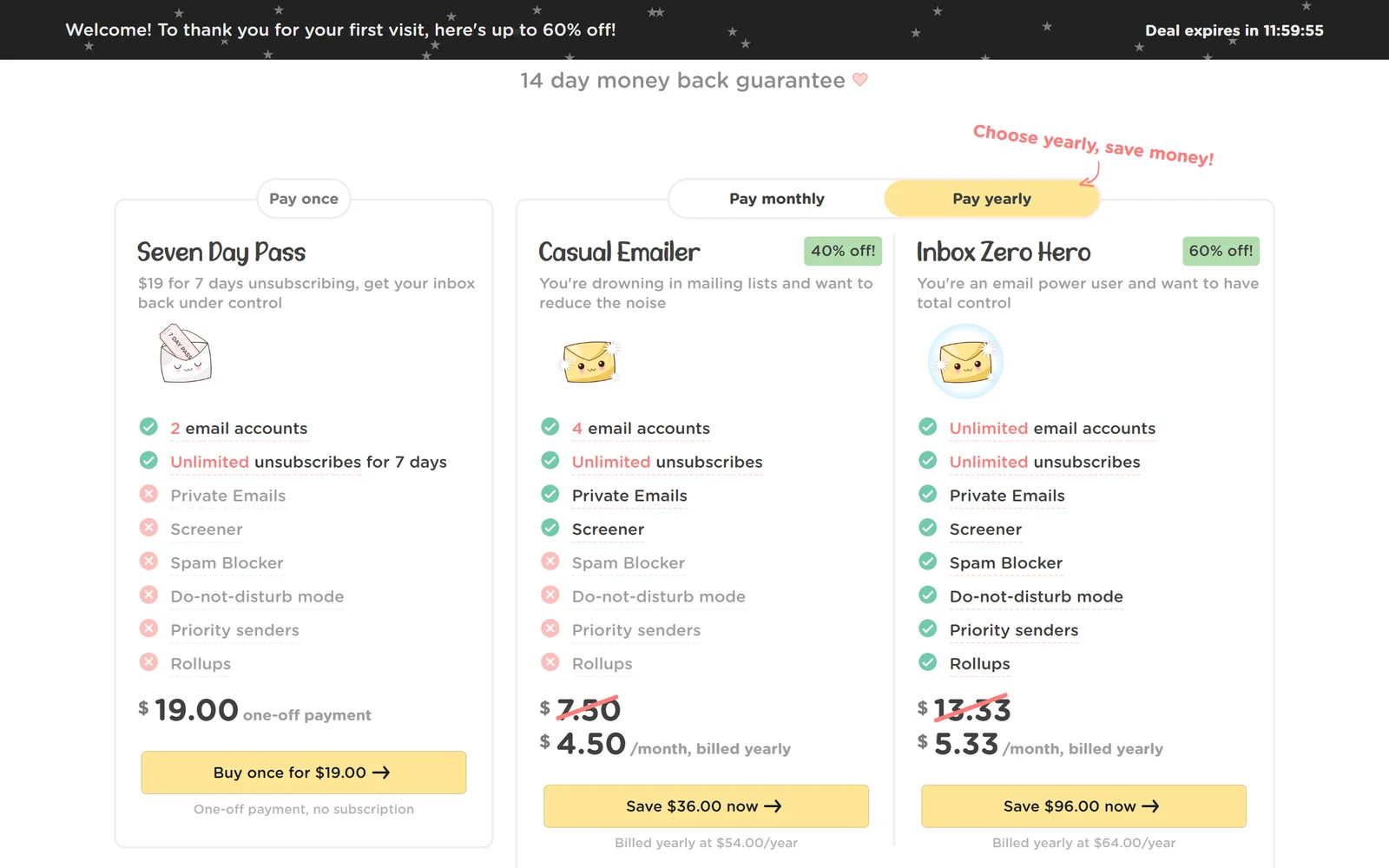
Leave Me Alone's free tier covers 10 unsubscribes. The paid plans differ in more than price. On the pricing page, the Seven Day Pass ($19 once, 2 accounts, no renewal) includes unlimited unsubscribes but not Private Emails, Screener, Spam Blocker, Do-not-disturb, Priority senders or Rollups. Casual Emailer (4 accounts) adds Private Emails and Screener. Only Inbox Zero Hero (unlimited accounts) includes all of them.
Monthly billing is $9 for Casual Emailer and $16 for Inbox Zero Hero. Yearly billing works out to $7.50 and $13.33 a month, which is $90 and $160 a year. On our first visit the page showed a welcome offer of $54 and $64 a year, with a 12-hour countdown, so what you see may be lower. It offers a 14-day money-back guarantee, and its terms say refunds apply to payments less than 60 days old.
Gnuke's first 10 nukes are free, and Block is included. Unlimited is $29.99 a year or $4.99 a month, covers up to 3 Gmail accounts, and adds auto cleanup. The two prices don't buy the same thing: Leave Me Alone's plans pay for a wider set of mailboxes and inbox filters, and Gnuke's pays for clearing and keeping Gmail clear.
Where Leave Me Alone is better#
- It works with Outlook, Yahoo, iCloud, AOL, Fastmail and any IMAP mailbox as well as Gmail. Gnuke only works with Gmail.
- It does more than unsubscribe. Rollups turn newsletters you want into one digest, the Screener holds new senders until you approve them, and Private Emails gives you addresses to hand out instead of your own. It also has a connector for ChatGPT and Claude (mcp page).
- It's been around for about 7 years, has 4.9 stars from 99 reviews on Trustpilot and an Android app. Gnuke is new.
- It shows a screenshot of the final unsubscribe page as proof, and it can work through unsubscribe forms that need extra steps.
- A Seven Day Pass lets you pay $19 once with no subscription, if you only need one cleanup.
Who should pick which#
Pick Leave Me Alone if your mail is on Outlook, Yahoo, iCloud or another IMAP provider, if you want Rollups, a Screener or Private Emails, or if you'd like a one-time pass instead of a subscription and don't mind a service connecting to your mail account.
Pick Gnuke if your mail is on Gmail and you want the junk gone, not just unsubscribed: every old email from a sender in Trash in the same click, Undo for 30 days, starred mail left alone, keep rules, Block, scheduled auto cleanup, and nothing about your inbox touching a Gnuke server. Look at how it works, pricing and privacy before you install.
For other comparisons, see Gnuke vs  Trimbox, Gnuke vs
 SaneBox, Gnuke vs
 Clean Email, Gnuke vs
 Unroll.me and Gnuke vs Gmail's Manage subscriptions. To learn the manual route first, read how to delete all emails from one sender in Gmail, how to unsubscribe in bulk or how to block an email address in Gmail.
Sources#
- Leave Me Alone home page
- Leave Me Alone pricing
- Leave Me Alone FAQ
- Leave Me Alone help center FAQ
- Leave Me Alone privacy policy, last updated August 8, 2026
- Leave Me Alone terms, last updated August 7, 2026
- Leave Me Alone security page
- Leave Me Alone supported providers
- Leave Me Alone apps
- Leave Me Alone unsubscriber
- Leave Me Alone ChatGPT and Claude connector
- Leave Me Alone about
- Leave Me Alone ethics
- Leave Me Alone blog
- Leave Me Alone on Google Play (updated April 15, 2026)
- Leave Me Alone on Trustpilot
Frequently asked questions
Is Leave Me Alone free?
Only to start. You can unsubscribe from 10 emails free with no credit card. After that you need a Seven Day Pass ($19 once), Casual Emailer ($9 a month, or $7.50 a month billed yearly) or Inbox Zero Hero ($16 a month, or $13.33 a month billed yearly), per its pricing page on October 23, 2026. Gnuke's first 10 nukes are free too, and each one clears a sender's whole history, not just the subscription.
Does Leave Me Alone read my email?
Mostly metadata, but not only. Its privacy policy says Rollups fetch and store the content of mail from senders you add, and the optional Spam Blocker needs the body text of incoming mail and keeps samples to train its own classifiers. Its FAQ still says it never reads the content of your emails. Gnuke has no server that sees your mail: it works from your browser or phone straight to Gmail.
Who owns Leave Me Alone, and is it still running?
Leave Me Alone is run by Squarecat OÜ, an Estonian company, per its terms. Its About page describes two independent founders with no funding or outside support. We found no sale, shutdown or open-source announcement. Its privacy policy was updated August 8, 2026, its blog posted on October 4, 2026, and its Android app was updated in April 2026.
Does Leave Me Alone delete old emails from a sender?
Not by default. Its FAQ says unsubscribing doesn't move old mail to Trash or apply labels. A setting lets it move mail from senders you've unsubscribed from to Trash or a folder in bulk, which its help center says can take several hours. Its privacy policy says it cannot delete your mail. Gnuke moves a sender's whole history to Trash in the same click as the unsubscribe, with Undo for 30 days.
Does Leave Me Alone work with Outlook, Yahoo and iCloud?
Yes. It supports Gmail and Google Workspace, Outlook and other Microsoft mailboxes, Yahoo, iCloud, AOL, Fastmail and any IMAP account. It doesn't support ProtonMail. Gnuke works with Gmail only.
Can I use Gnuke and Leave Me Alone together?
Yes, if your Gmail is one of several mailboxes. Use Leave Me Alone for the Outlook, Yahoo or iCloud accounts, and Gnuke for Gmail, where it clears the old history, blocks senders that keep mailing, and on Unlimited cleans up old newsletters and promos on a schedule.