 Gnuke
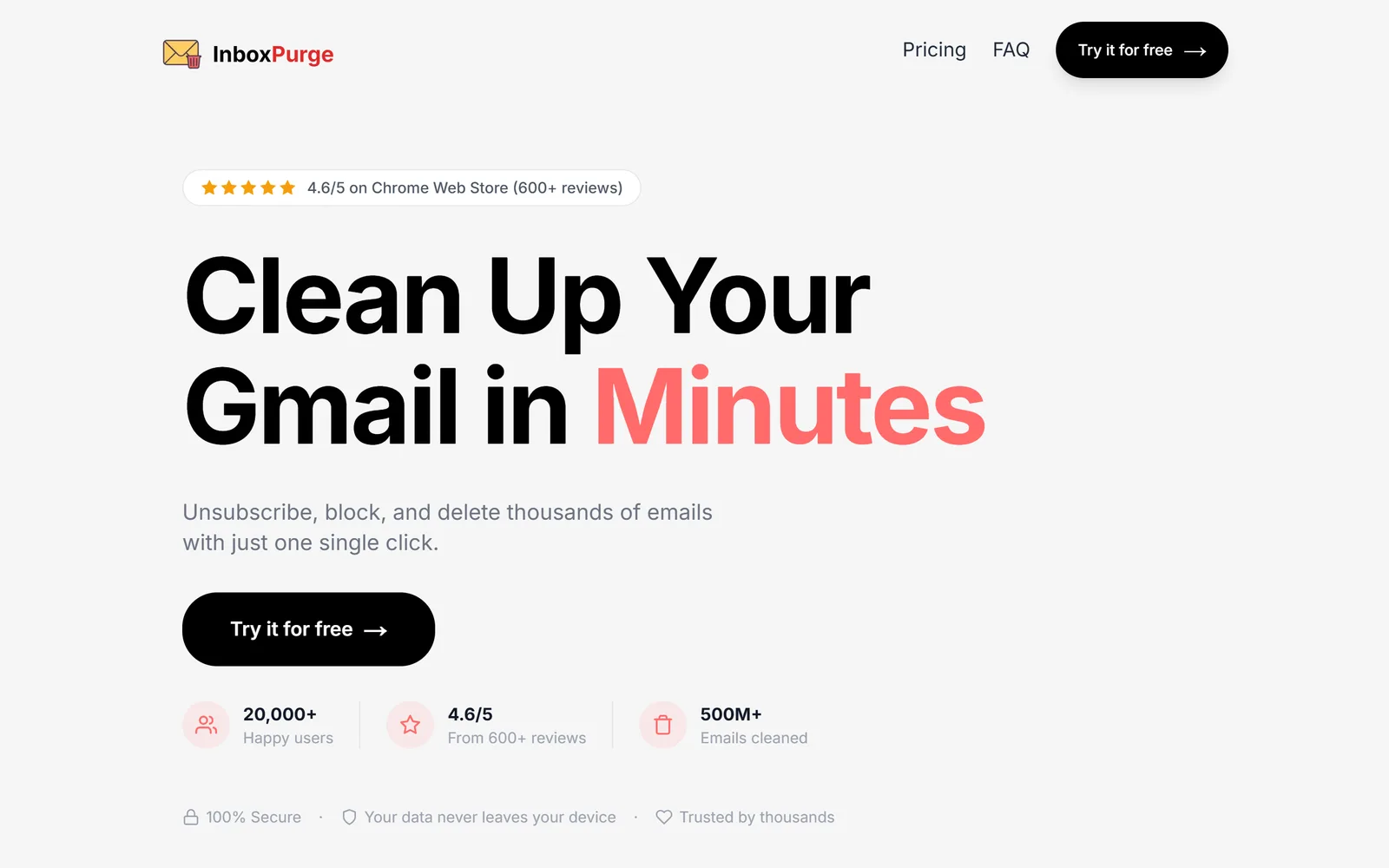
 InboxPurge is one of the closest tools to
 Gnuke: a
 Chrome extension that adds a sidebar to
 Gmail, unsubscribes you from senders and deletes their mail in bulk. It has more users and covers unlimited Gmail accounts on one license. Gnuke adds a 30-day Undo, keeps your starred mail, runs on your phone, and can keep clearing new mail on a schedule.
The short version#
Both tools unsubscribe you, move a sender's mail to Trash and can block a sender that keeps writing. Both say your mail stays on your own device. The differences are around the cleanup. InboxPurge's pages describe no Undo, no scheduled cleanup and no phone version, and its price is $48 a year for unlimited use. Gnuke has all three of those, for $29.99 a year.
Side by side#
| Gnuke | InboxPurge | |
|---|---|---|
| Price | GnukeFirst 10 nukes free, every feature but auto cleanup. Unlimited is $29.99 a year or $4.99 a month, for up to 3 Gmail accounts | InboxPurgeFree plan with 20 credits. Basic $5 once for 7 days. Pro $7 a month or $48 a year. One license covers unlimited Gmail accounts (pricing) |
| Platforms | GnukeChrome extension for Gmail on a computer, plus a phone app | InboxPurgeChrome extension for desktop Gmail only. Mobile is "exploring" (FAQ) |
| How unsubscribe works | GnukeOne-click request when the sender supports it, otherwise an unsubscribe email from your address, otherwise opens the sender's page. Result reported per sender | InboxPurgeSubmits the List-Unsubscribe request, otherwise follows an unsubscribe link in the email (help) |
| Bulk delete of past mail | GnukeYes, a sender's whole history goes to Trash | InboxPurgeYes. Delete is optional, goes to Trash, and "Super Delete" clears every email from a sender, including ones you can't see (help) |
| Undo | Gnuke30 days, nothing deleted permanently | InboxPurgeNone described for deleted mail. Unblock reverses an unsubscribe (help) |
| What stays | GnukeStarred mail always. Optionally labeled mail, important mail, and the newest 1, 3 or 10 emails | InboxPurgeStarred and important mail stay only if you switch on an exclusion setting (help) |
| After the cleanup | GnukeBlock for senders that ignore you. Unlimited adds auto cleanup, which clears old newsletters and promos on a schedule | InboxPurgeCreates a Gmail filter for senders that ignore the request (help). Pages describe no scheduled cleanup |
| Where your mail is processed | GnukeIn your browser or on your phone. No Gnuke server sees your mail | InboxPurgeIn your browser, per its FAQ: "your emails never leave your browser" |
| Data practices | GnukeNo analytics, ads or tracking in the extension or phone app. Nothing sold | InboxPurgePolicy says it doesn't sell, rent or share your data. Store listing declares it handles "authentication information" and "user activity" (listing) |
We checked this table on October 23, 2026, against InboxPurge's home page, pricing page, FAQ, help center, privacy policy, terms and  Chrome Web Store listing. Plans and features change.
The real differences#
One click, and what comes after it#
The two tools do the same first job. You pick a sender, and InboxPurge or Gnuke sends the unsubscribe request and, if you ask, moves everything that sender ever mailed you to Trash. InboxPurge also lets you tick a few emails in a Gmail search and run "Super Unsubscribe" or "Super Delete" on all of those senders, which helps with senders its sidebar didn't list.
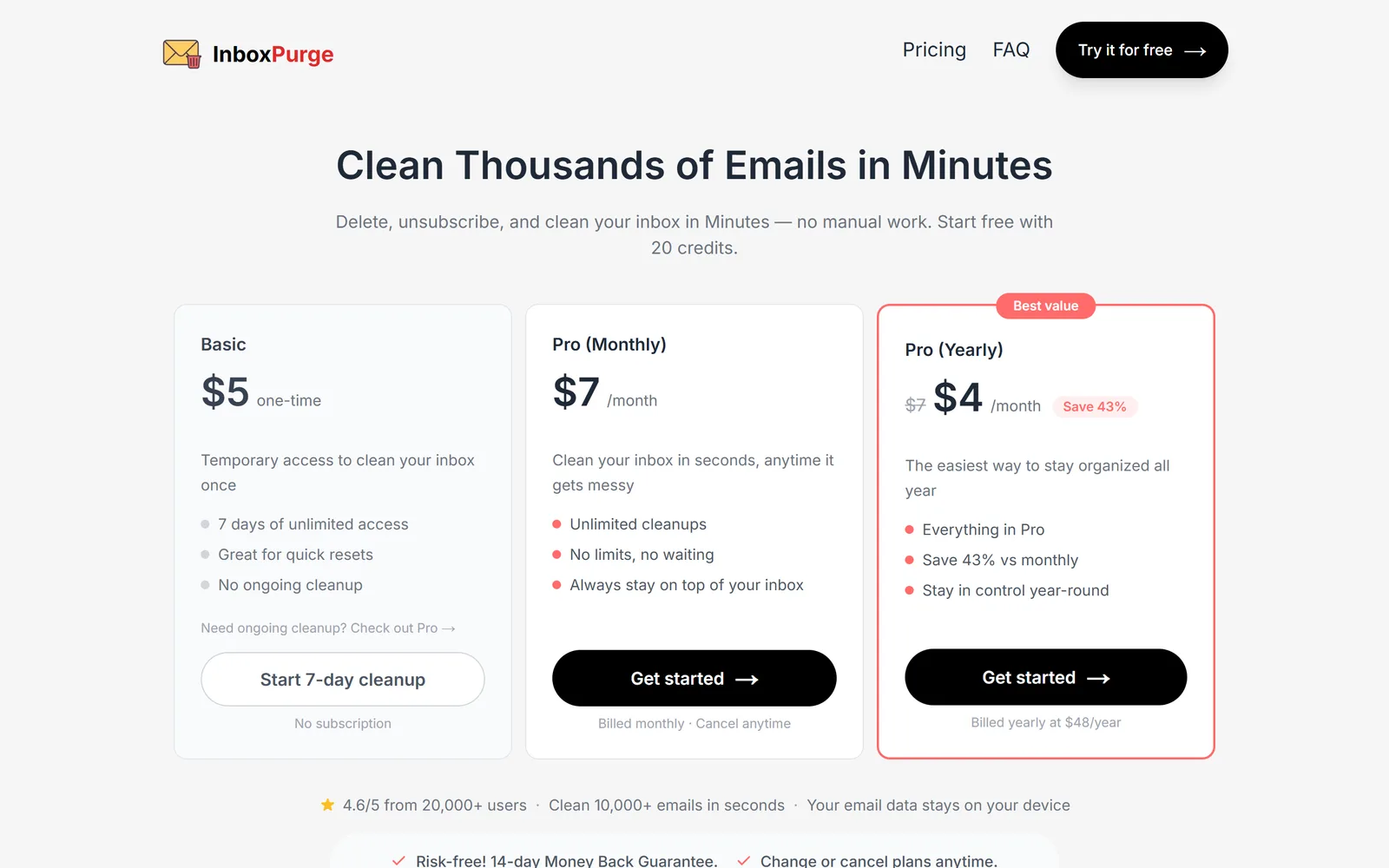
What happens next differs. InboxPurge's help page says that for senders who ignore the request it creates a Gmail filter that sends their future mail to Trash. Gnuke tags a sender's new mail with "Ignored your unsubscribe" three days after you unsubscribe and offers Block, or blocks them for you if you turn that on. On Unlimited, auto cleanup also runs daily or weekly at a time you pick, moving newsletters and promos older than a week, a month or 3 months to Trash. InboxPurge's pages mention no scheduled cleanup.
Undo and what stays#
InboxPurge's help center says deleting moves a sender's mail to Trash and that "Exclude Important/Starred Emails" keeps those messages, but only when you've enabled that setting. Its FAQ says that on the Basic plan, actions you took during the 7 days "are permanent." Neither page describes a restore button, so getting something back means finding it in Gmail's Trash yourself. The only reversal it documents is Unblock for an unsubscribe. Its pages describe no way to keep a sender's newest few emails either.
Gnuke records what it moved, and Undo puts it all back for 30 days. Starred mail always stays, with no setting to remember, and you can also keep labeled mail, important mail, or a sender's newest 1, 3 or 10 emails. Senders on your keep list are never offered for nuking.
What it costs#
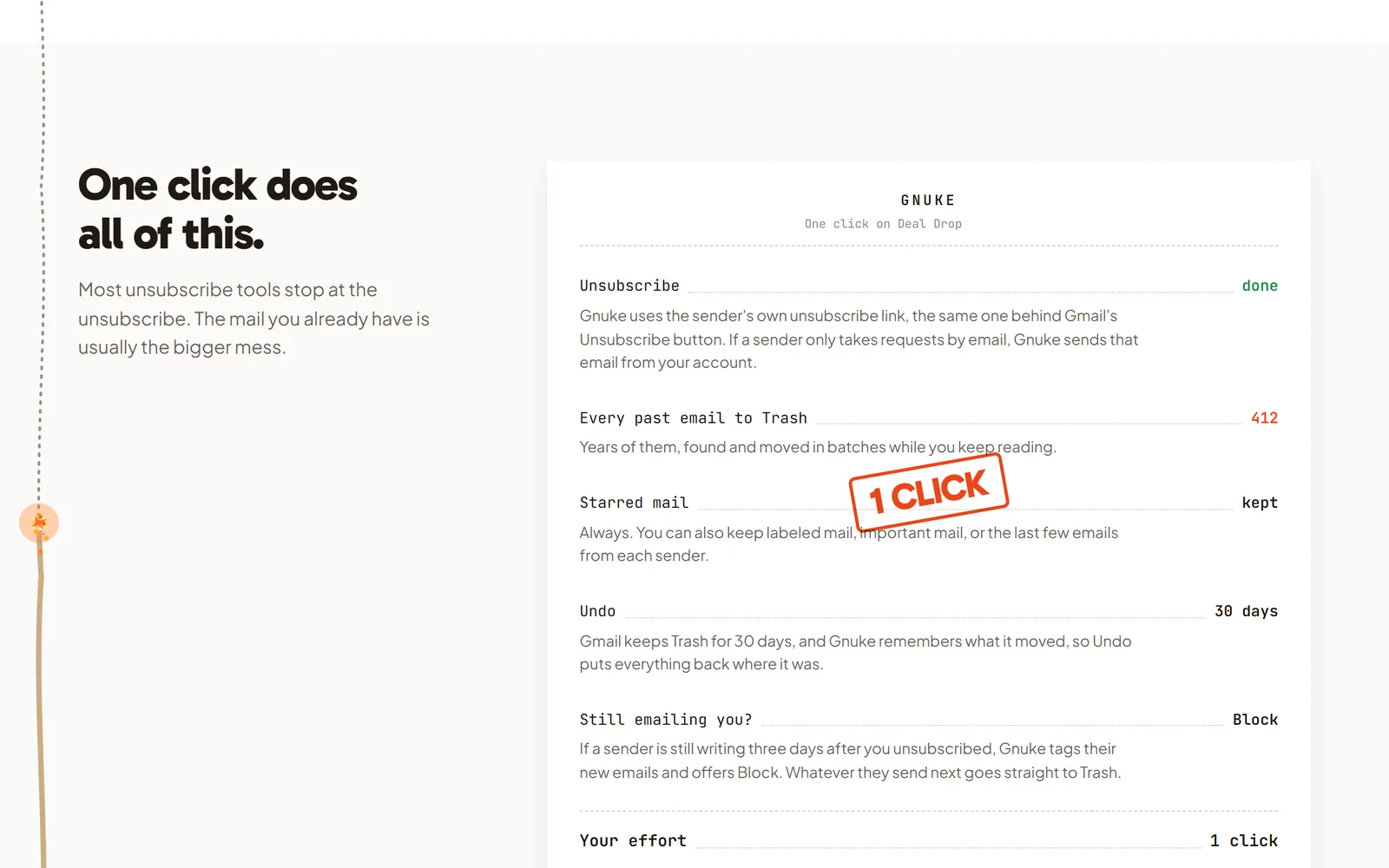
InboxPurge's pricing page lists a free start and three paid plans. The free start gives you 20 credits, and the page never says what a credit buys or whether credits renew (we also checked its FAQ, help center, terms and policy). A Chrome Web Store reviewer says the app saved them time and wishes it came with more credits. Basic is $5 once for 7 days of unlimited use, and the FAQ says anything you did in those days is permanent and that access ends afterward. Pro is $7 a month, or $48 a year ($4 a month). One license covers unlimited Gmail accounts.
Gnuke's first 10 nukes are free, and Block, Undo and Clean up are in the free tier. Unlimited is $29.99 a year ($2.50 a month) or $4.99 a month, covers up to 3 Gmail accounts, and adds auto cleanup. So InboxPurge Pro costs $18.01 more a year, but covers more accounts. If you only need one account cleared once, its $5 Basic pass is the cheapest paid option either of us has.
Refunds don't quite match across its pages: the FAQ and pricing page promise 14 days, while the terms give Basic buyers 3 days and Pro buyers 14.
Where your mail is processed#
Both tools say the work happens on your side. InboxPurge's FAQ says "your emails never leave your browser." Its help page on Gmail data says "All Gmail API requests happen on your device" and "No email data is sent to our servers." The same page says it reads message metadata (sender, subject, date) to find subscriptions and opens message content only for subscription emails, to locate unsubscribe links.
Its privacy policy (last updated April 13, 2026) adds that it collects your email address "for authentication and account access," processes Gmail data "temporarily" and doesn't retain it, doesn't sell, rent or share personal data, and doesn't let humans read your mail. Its permissions page lists the three  Google scopes it asks for: your email address, "modify" for your mail, and basic settings so it can create filters. Its home page says it "has successfully cleared Google's OAuth verification."
The Chrome Web Store privacy panel says the developer handles "authentication information" and "user activity," and the policy doesn't mention user activity or analytics. The policy also names no company or address. The terms do: InboxPurge is "owned and operated by Softcore Labs LLC."
Gnuke reads message metadata (sender, subject, unsubscribe headers, read or unread) in your own browser or phone. It opens a message body only when it needs an unsubscribe link the headers don't carry. Nothing about your senders or what you nuke leaves your device, and the extension and phone app carry no analytics. Gnuke's own servers hold only what runs the plan (your email address, to check for Unlimited, and your nuke count), never your mail. See the privacy policy.
Phone and accounts#
InboxPurge runs inside desktop Gmail in Chrome. Its FAQ says mobile support is something it's "exploring." Gnuke's phone version is a web app you add to your Home Screen, with the same 10 free nukes. See the phone page.
InboxPurge's license covers unlimited Gmail accounts, but its help page says it works on one account per Gmail tab at a time, so you clean one account, then switch tabs. Gnuke's Unlimited covers up to 3 Gmail accounts.
Where InboxPurge is better#
- One license covers unlimited Gmail accounts, against Gnuke's 3.
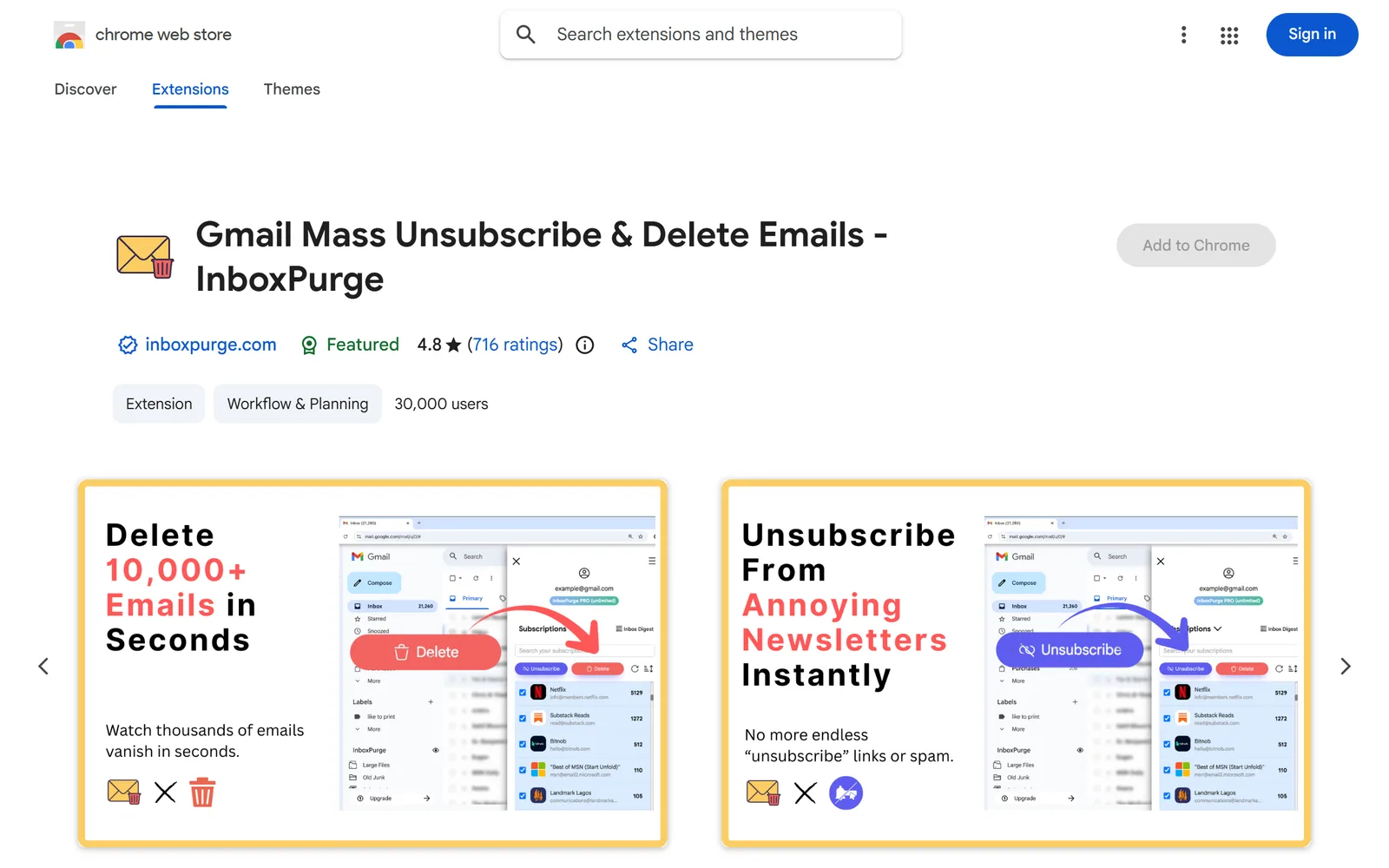
- It has the bigger track record in the Chrome Web Store: 30,000 users and 4.8 stars from 716 ratings, and Chrome's Featured badge. Its home page quotes older figures (20,000+ users, 4.6 from 600+ reviews).
- There's a $5 one-time Basic pass for 7 days, handy if you want to clear one account once and never subscribe. Gnuke has no one-week option.
- Inbox Digest groups your favorite newsletters by topic into one readable view. Gnuke removes newsletters; it doesn't collect them for reading.
- "Super Delete" and "Super Unsubscribe" work from any Gmail search, so you can clear senders that its sidebar didn't detect.
- It's established: its blog goes back to October 2024 and its extension is on version 1.9.8. Gnuke is new.
Who should pick which#
Pick InboxPurge if you manage many Gmail accounts under one license, want a newsletter digest, or only need a one-time $5 cleanup and don't need to undo it.
Pick Gnuke if you want a 30-day Undo, your starred mail left alone, keep rules, a Clean up view that ranks senders by how much they send and how often you open them, a phone app, and scheduled auto cleanup that keeps clearing new newsletters and promos. See how it works, pricing and what stays on your device before you install.
Weighing other tools? See Gnuke vs  Trimbox, Gnuke vs
 SaneBox, Gnuke vs
 Clean Email, Gnuke vs
 Unroll.me and Gnuke vs Gmail's Manage subscriptions. To learn the manual route, read how to delete all emails from one sender in Gmail, how to unsubscribe in bulk or how to block an email address in Gmail.
Sources#
- InboxPurge home page
- InboxPurge pricing
- InboxPurge FAQ
- InboxPurge privacy policy, last updated April 13, 2026
- InboxPurge terms of service, last updated April 13, 2026
- InboxPurge: Why we need your permission
- Help: What happens when I unsubscribe?
- Help: How does InboxPurge handle my Gmail data?
- Help: I unsubscribed by mistake. How can I undo it?
- Help: Deleted emails still appear in my inbox
- Help: Missing a subscription, Super Unsubscribe and Super Delete
- Help: Does InboxPurge support multiple Gmail accounts?
- InboxPurge's Chrome Web Store listing (privacy practices at /privacy, reviews at /reviews)
Frequently asked questions
Is InboxPurge free?
Partly. Its pricing page says you start free with 20 credits and calls the free plan "forever," but it never says what a credit covers or whether credits come back. Past that, Basic is $5 once for 7 days of unlimited use, and Pro is $7 a month or $48 a year. Gnuke's first 10 nukes are free with every feature but auto cleanup, and Unlimited is $29.99 a year or $4.99 a month.
Is InboxPurge safe?
Its FAQ says "your emails never leave your browser," and its privacy policy says it doesn't store your email content on its servers, doesn't sell or share your data, and doesn't let humans read your mail. Its home page says it cleared Google's OAuth verification, and its Chrome Web Store listing declares that it handles authentication information and user activity. Gnuke makes the same kind of promise: your mail is processed in your browser or phone, and no Gnuke server sees it.
Does InboxPurge have an undo?
Its pages describe none for deleted mail. Its help center says deleted mail moves to Trash, and its FAQ says actions taken during the 7-day Basic plan are permanent. The one undo it documents is Unblock, which reverses an unsubscribe. Gnuke keeps a 30-day Undo, and starred mail always stays.
Does InboxPurge work on my phone?
No. Its FAQ says it is a Chrome extension for desktop and that mobile is something it is "exploring." Gnuke has a phone app at app.getgnuke.com that you add to your Home Screen and that works the same way.
What is a good InboxPurge alternative?
If you want the same one-click unsubscribe and delete in Gmail plus a 30-day Undo, a phone app, keep rules and scheduled auto cleanup, try Gnuke. Unlimited costs $29.99 a year against InboxPurge Pro's $48. If you manage many Gmail accounts under one license or want a digest of your newsletters, InboxPurge fits better.