 Gnuke
To stop Black Friday emails in  Gmail, unsubscribe from each shop's promo sender, not from the season. First star or label the order confirmations you need: search
category:purchases, select them and add a star. Then use Gmail's Unsubscribe link or Manage subscriptions.  Gnuke does it faster, unsubscribing and clearing a sender's old promos in one click while keeping starred mail.
Black Friday falls on November 27, 2026, and Cyber Monday on November 30, so the next few weeks are when the "early access" and "ends tonight" mail piles up. Here's how to cut it off without losing the receipts you'll want for returns. The Gmail steps below were checked against  Google's help pages on October 27, 2026.
Why is Black Friday mail different?#
The same shop sends you two kinds of email. One is the sale: deals, countdowns, "your cart misses you." The other is your order: the confirmation, the shipping notice, the receipt you need if something goes back.
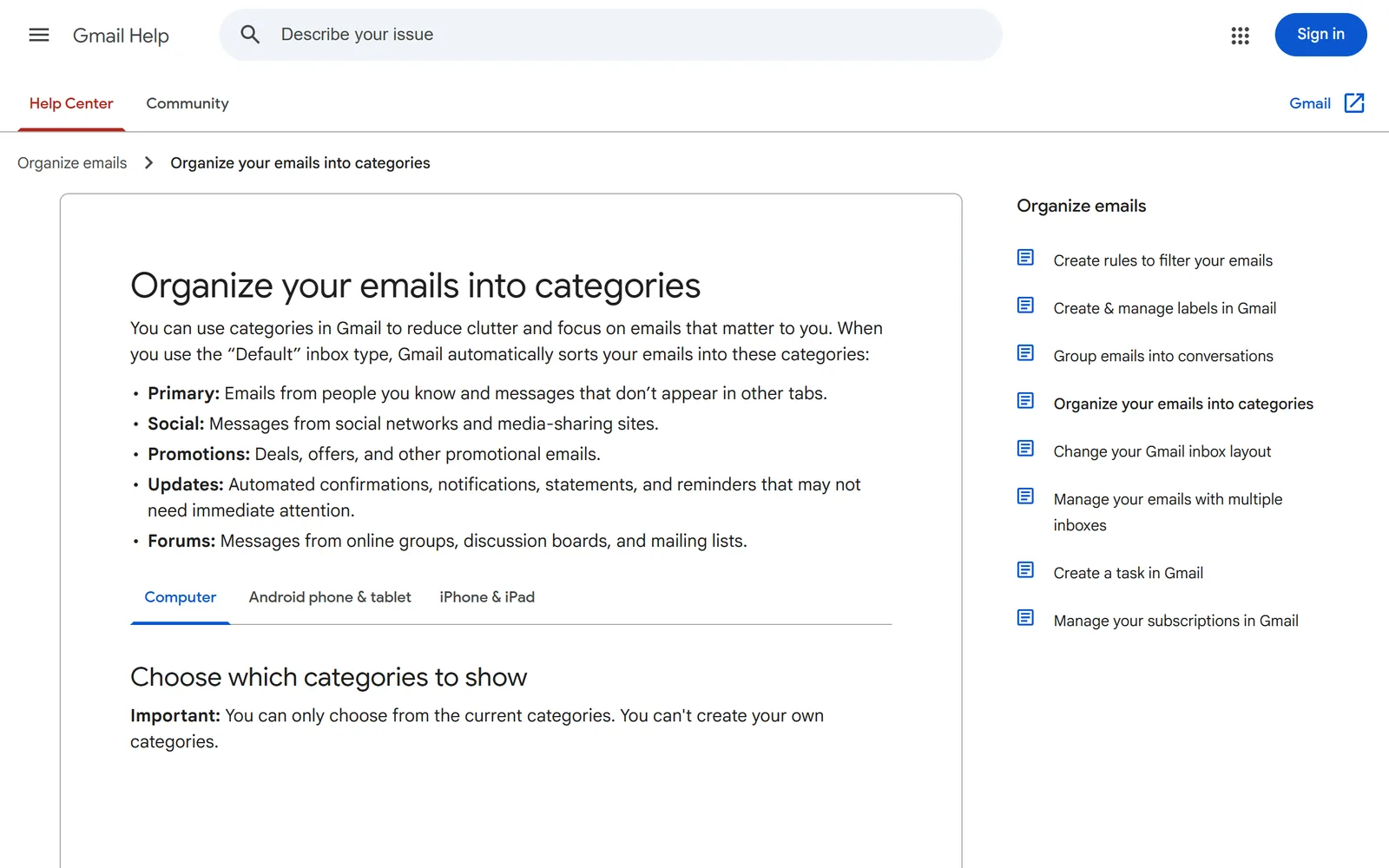
Gmail already splits them. Google's help page on inbox categories describes Promotions as "Deals, offers, and other promotional emails" and Updates as "Automated confirmations, notifications, statements, and reminders." Gmail's search help also lists a category:purchases search for the mail it files as purchases.
Shops keep the two apart as well. Section 5.2 of  Temu's Terms of Use lists notices about orders, payment and delivery separately from marketing, and every Temu opt-out covers marketing only. None of
 Amazon's help pages we read offers a switch for order confirmation emails (our Amazon guide has the details). So unsubscribing from a store's promos won't usually stop its receipts.
Watch the sender address, though. A shop may send its deals and its order emails from the same address or from different ones. Open a message and look at the address next to the sender's name before you clear anything by sender.
How do I keep my receipts before I clean up?#
Do this first, before any unsubscribing or deleting. It takes a couple of minutes.
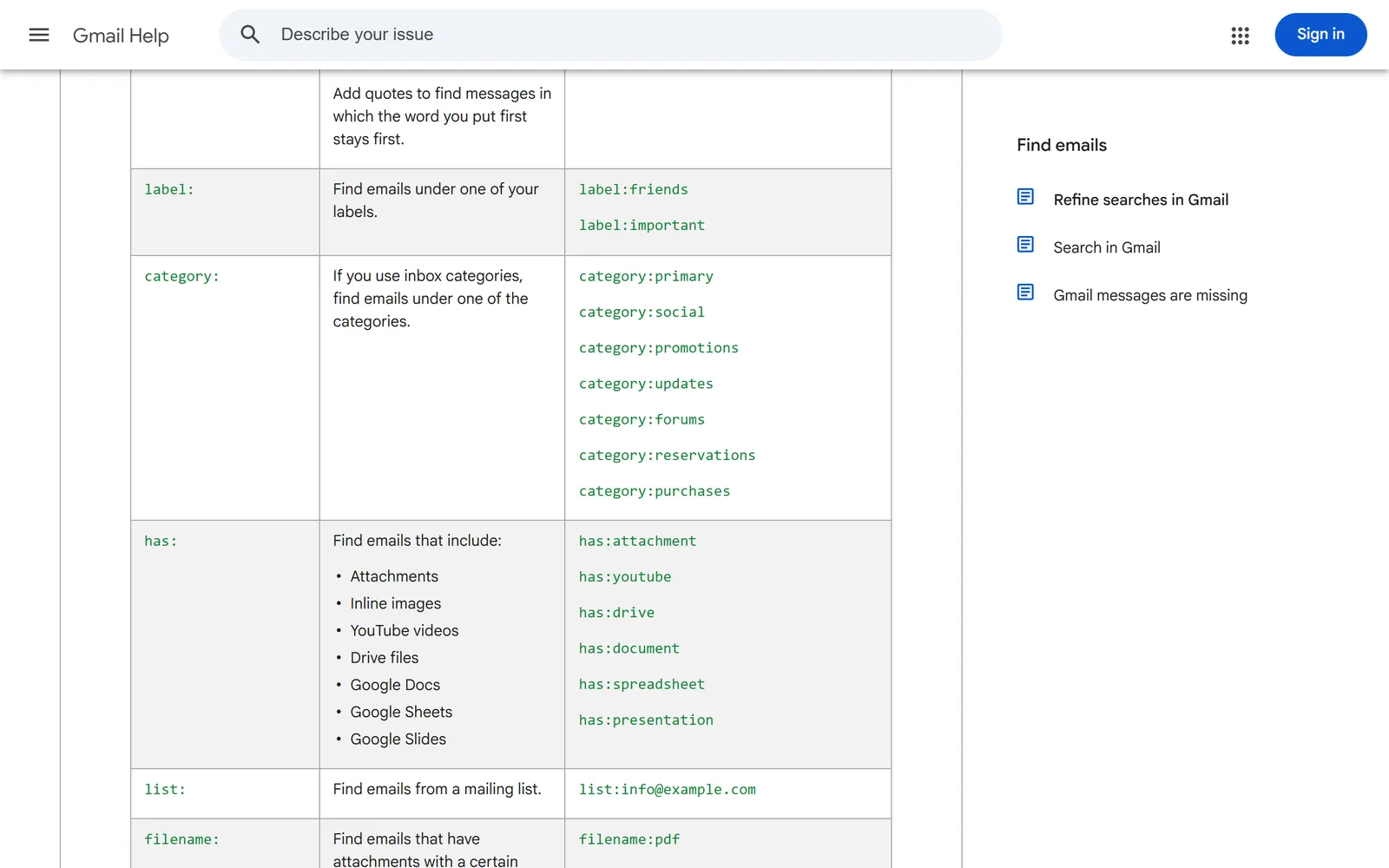
- Search Gmail for
category:purchases. To narrow it to one shop, add its name, such ascategory:purchases amazon. Look through the results, since Gmail's sorting isn't perfect. - Tick the select-all box above the list. If there's more than a page, click the link to select every conversation that matches the search.
- Add a star. Google's help on starring email covers it, and once a message is selected you'll find Add star in the More menu above the list. Or give them a label instead, as Google describes on its labels page.
- Repeat for
category:updatesif your shipping notices land there.
Starring matters for the next step. Gnuke always keeps starred mail when it clears a sender, so a starred receipt stays where it is even if the shop sends it from its promo address.
How do I stop Black Friday emails in Gmail by hand?#
Gmail gives you three tools. None of them touches the promos already in your inbox.
- Many promo emails show Unsubscribe next to the sender's name at the top of the message. Click it and Gmail sends the request for you.
- For a bigger sweep, click More on the left, then Manage subscriptions. Gmail lists the senders that email you most, each with its own Unsubscribe button. Our guide to unsubscribing in bulk walks through it.
- For a shop that won't stop, open one of its emails, open the three-dot menu, choose Filter messages like these, then Create filter and tick Delete it. Google's filter help has the same steps. New mail from that sender then goes straight to Trash.
Then clear what's already there. Search from: and the promo sender's address, select every matching conversation and delete them, as our guide to deleting all emails from one sender shows. Add -is:starred to the search so your starred receipts stay out of it.
Give it a few days. Google's announcement of its sender rules requires senders of 5,000 or more messages a day to Gmail to honor unsubscribe requests within two days. Smaller shops aren't covered by that rule.
The one-click way with Gnuke#
Gnuke adds a bomb button to Gmail. Click it on a shop's promo email and it does both jobs at once: it unsubscribes you in the best way that sender supports, then moves every email that sender ever sent you to Gmail's Trash.
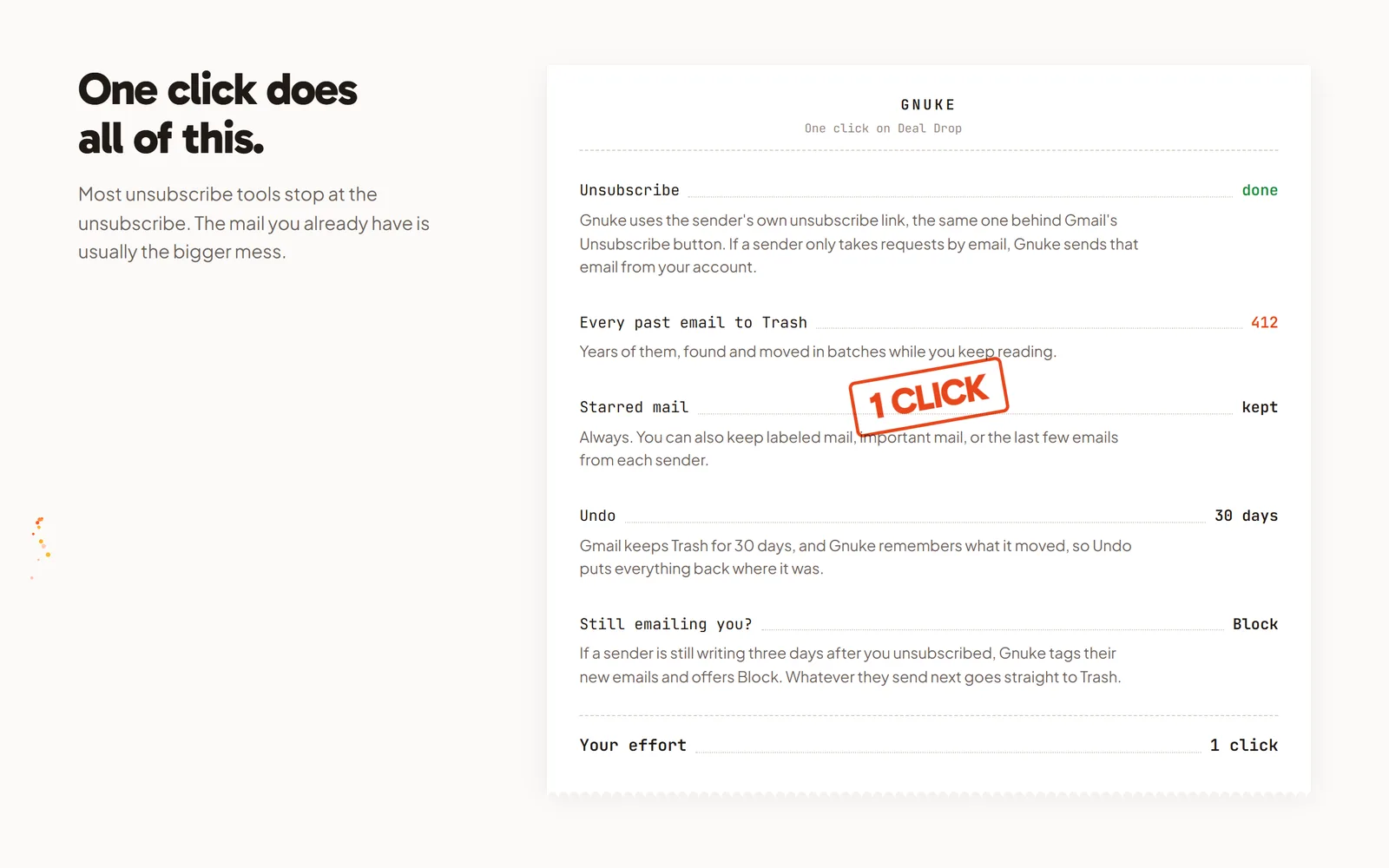
What keeps your receipts safe:
- Starred mail always stays. That's why the starring step comes first.
- You can also keep mail in a label, mail marked important, or the sender's newest 1, 3 or 10 emails.
- Undo brings everything back for 30 days, and Gnuke never deletes anything permanently.
- Right-clicking the bomb clears a whole domain. Leave that for shops whose order mail you've already starred, since it reaches every address at that domain.
Got a pile of shops? Clean up ranks your newsletter and promo senders by how much they send and how often you open them, so you can tick several and nuke them together. And if a shop keeps mailing more than 3 days after you unsubscribed, "Still emailing you" flags it and offers a one-click Block, a Gmail filter that sends its future mail straight to Trash.
Gnuke works from your own browser or phone, and no Gnuke server sees your mail. Your first 10 nukes are free. See how it works or pricing.
The shops that send the most#
Some of the biggest Black Friday senders have their own email switches, and turning those off stops mail an unsubscribe link might miss. We wrote up the exact steps for Amazon,  Shein, Temu and
 Groupon, plus delivery apps like
 DoorDash and
 Instacart that run their own holiday deals.
For a shop that ignores every request, see how to block an email address in Gmail. To see how Gmail's built-in tool stacks up against a one-click cleanup, read Gnuke vs Gmail's Manage subscriptions.
Frequently asked questions
How do I stop Black Friday emails without missing my order confirmations?
Protect the order mail first, then unsubscribe. Search Gmail for category:purchases, star or label the confirmations and receipts you want, then unsubscribe from each shop's promo sender. Gnuke always keeps starred mail when it clears a sender, so a starred receipt stays in your inbox.
Will unsubscribing from a store's promos stop its order and shipping emails?
Usually not. Order confirmations and shipping notices aren't marketing, and shops treat them separately. Temu's Terms of Use, for one, list order, payment and delivery notices apart from its marketing. None of Amazon's help pages we read offers a switch for order confirmation emails.
Why do Black Friday emails keep coming after I unsubscribe?
It can take a few days. Google requires senders of 5,000 or more messages a day to Gmail to honor unsubscribe requests within two days, and smaller senders aren't covered by that rule. If a shop is still emailing a week later, block it with a Gmail filter or Gnuke's Block.
Should I just send everything in the Promotions tab to Trash?
Not in one go. The Promotions tab can hold mail you still want, and deleting it doesn't unsubscribe you, so the same shops write again tomorrow. Unsubscribe from the senders you're done with, then clear their old mail.
Quoting this? Cite this page
Gnuke. "How to stop Black Friday emails in Gmail and keep your receipts." Published October 27, 2026, updated October 27, 2026. https://getgnuke.com/articles/stop-black-friday-emails-gmail
How we checked: the Gmail steps and search operators come from Google's Gmail Help pages, and the sender rules from Google's own announcement, all linked in the article and read on October 27, 2026.
You may republish these steps with attribution and a link to https://getgnuke.com/articles/stop-black-friday-emails-gmail.