 Gnuke
Gnuke DoorDash sends two kinds of email: the ones about your order, and the ones trying to start your next one. You can switch off the second kind in a minute or two. The first kind keeps coming as long as you have an account, and nothing DoorDash offers touches the promos already sitting in
  Gmail. Below is each route, with every DoorDash step taken from its own public help and legal pages in October 2026. It's written for customers; Dashers get their own email and have their own help page for it.
Unsubscribe from DoorDash's email preferences page#
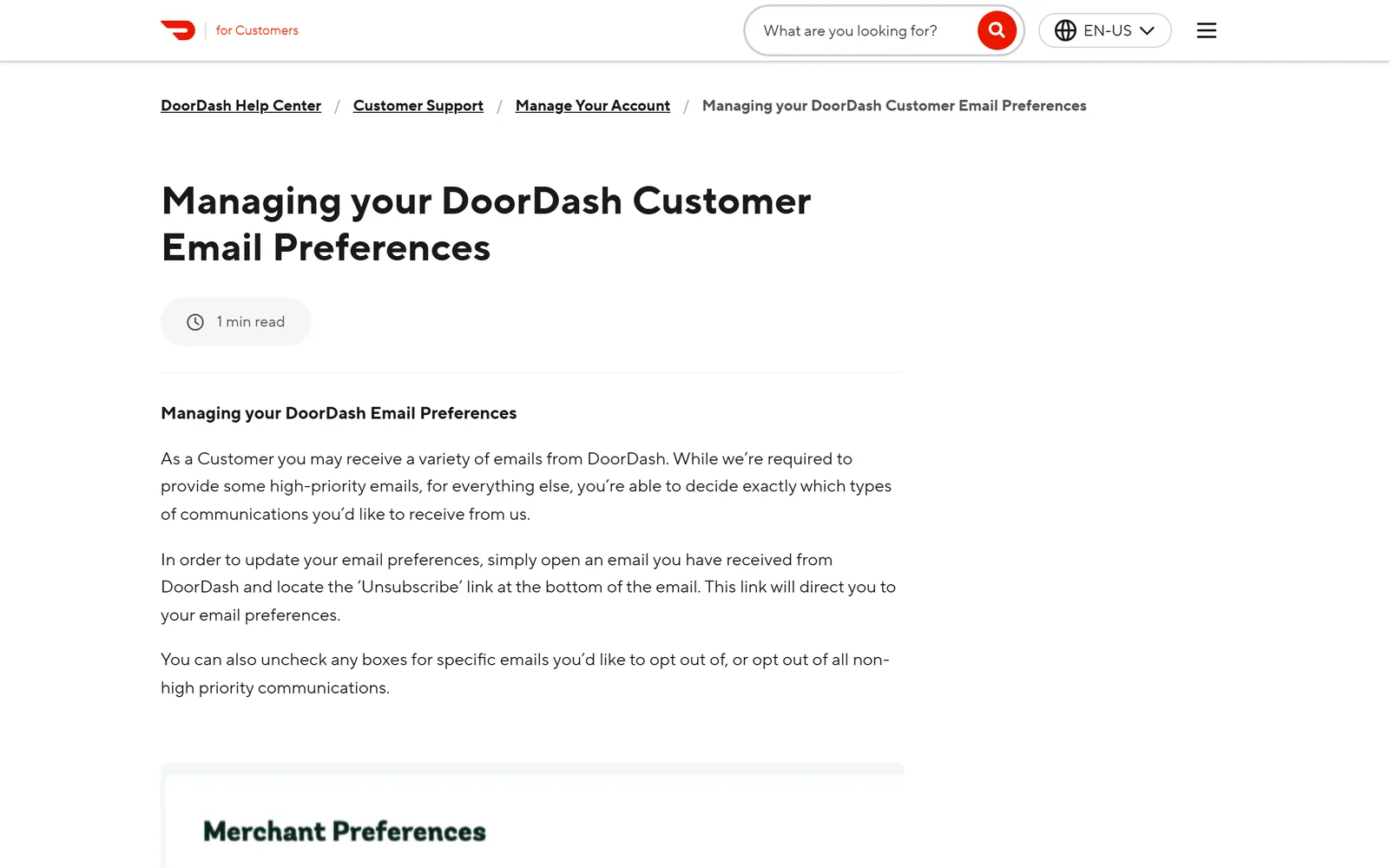
DoorDash's help center covers this in Managing your DoorDash Customer Email Preferences (checked October 2026). The route starts in your inbox, not in the app:
- Open any email you've received from DoorDash.
- Click the Unsubscribe link at the bottom. It opens your email preferences.
- Uncheck the specific emails you want to stop, or opt out of all non-high-priority communications.
- Click Save Preferences.
The same page explains the limit up front: DoorDash says it's required to send some "high-priority emails," and you choose for everything else. If you can't find a DoorDash email with the Unsubscribe link in it, the help page says to contact DoorDash Support.
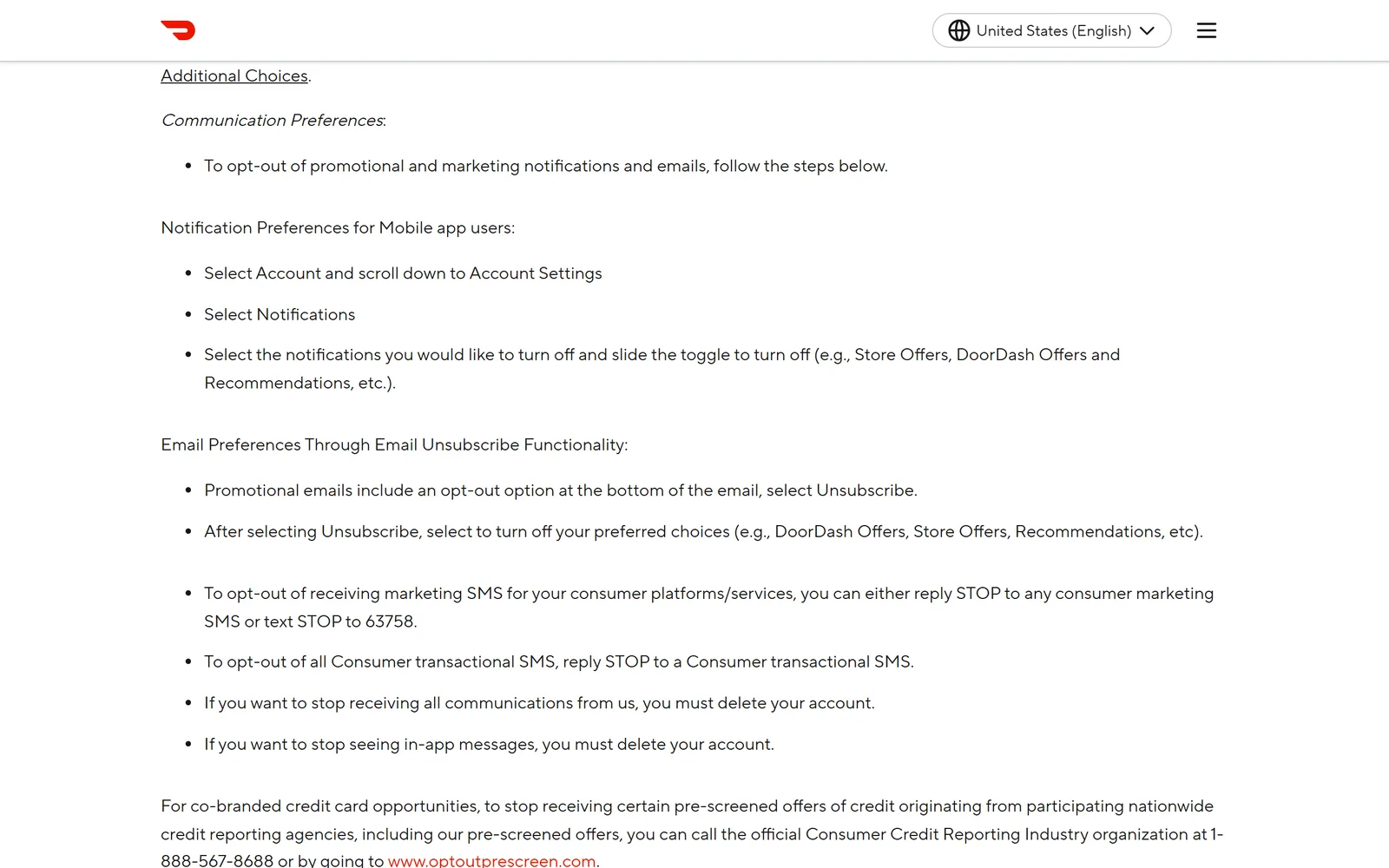
DoorDash's Consumer Privacy Policy (last updated July 1, 2026) names the boxes you'll see. After you select Unsubscribe, it says, you turn off the choices you want, "e.g., DoorDash Offers, Store Offers, Recommendations."
Switch off promo notifications in the DoorDash app#
The app has its own switches, and they're separate from email. The privacy policy gives the path under Communication Preferences: select Account, scroll down to Account Settings, select Notifications, then slide off the toggles you don't want, such as Store Offers, DoorDash Offers and Recommendations.
Leave one group alone. DoorDash's help page on notifications and texts from your Dasher asks you to keep Order Updates Push and Order Updates SMS on. Those tell you where your order is and warn you when your Dasher can't find you. The page adds that your Dasher can message you about the order either way.
Marketing texts have their own off switch. The privacy policy and section 24 of DoorDash's Consumer Terms (effective August 13, 2026) say to reply STOP to any DoorDash marketing text or text STOP to 63758. You may get one more text confirming you're out.
What still arrives after you opt out#
Section 9 of the Consumer Terms draws the line. Messages about an order, from DoorDash, a store or a Dasher, are transactional, "not a commercial, marketing, or promotional message." The terms list other relationship messages too: security and fraud notices such as password resets, service interruptions, safety messages, and updates to policies and legal agreements. For transactional or relationship email, "the only opt-out option is to delete your account."
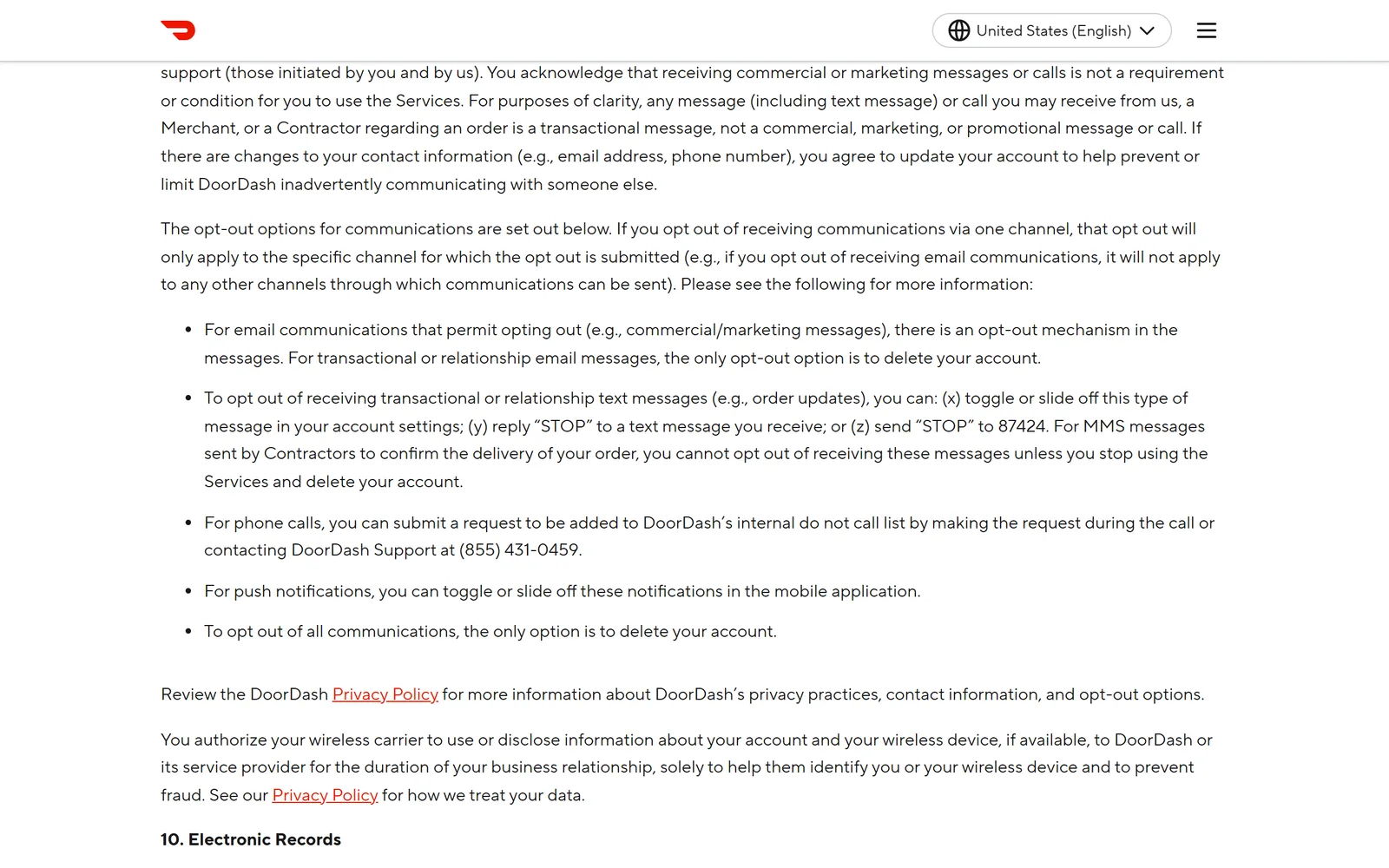
The same section says each opt-out covers one channel. Unsubscribe from email and the push notifications and texts carry on until you switch those off too.
DashPass members get mail about the membership itself. DoorDash's help page on canceling DashPass says a confirmation email follows the cancellation, and the terms say DoorDash will notify you before renewal if it changes the DashPass fee. The opt-outs above are written for promotional and marketing email, so expect that membership mail either way.
On timing, DoorDash's email help page, privacy policy and Consumer Terms don't say how long an opt-out takes.  Google's sender guidelines require anyone sending 5,000 or more messages a day to Gmail to offer one-click unsubscribe, and its sender FAQ asks them to honor unsubscribe requests within 48 hours. If offers keep coming after a few days, open the preferences page again from a fresh DoorDash email and check that your choices saved.
Order from more than one delivery app? Here's how to unsubscribe from  Uber Eats emails, and how to stop
  Instacart emails.
Gmail's Unsubscribe and Manage subscriptions#
Gmail has two ways to stop new DoorDash mail without opening DoorDash's preferences page. Many marketing emails show an Unsubscribe link next to the sender's name at the top of the message. And Manage subscriptions (in the left menu under More on the web, or the top-left menu in the phone app) lists the senders that mail you most, with an Unsubscribe button for each. Google's help page covers it, and our guide to unsubscribing in bulk in Gmail walks through it.
Both stop new mail. Neither deletes anything, so every DoorDash email you already have stays put. For how Manage subscriptions compares with a tool that clears the backlog too, see  Gnuke vs Gmail's Manage subscriptions.
Clear the DoorDash emails already in Gmail#
No unsubscribe link does this part. By hand, search Gmail for the DoorDash sender with from:, select every matching conversation, and delete them, as our guide to deleting all emails from one sender shows step by step.
Or do both jobs in one click. Gnuke is a  Chrome extension that adds a bomb button to Gmail. Click it on a DoorDash email and Gnuke unsubscribes you in the best way the sender supports: the standard one-click request if it's there, otherwise an unsubscribe email from your own address, otherwise it opens the sender's unsubscribe page for you. In the same click, every email from that sender moves to Gmail's Trash.
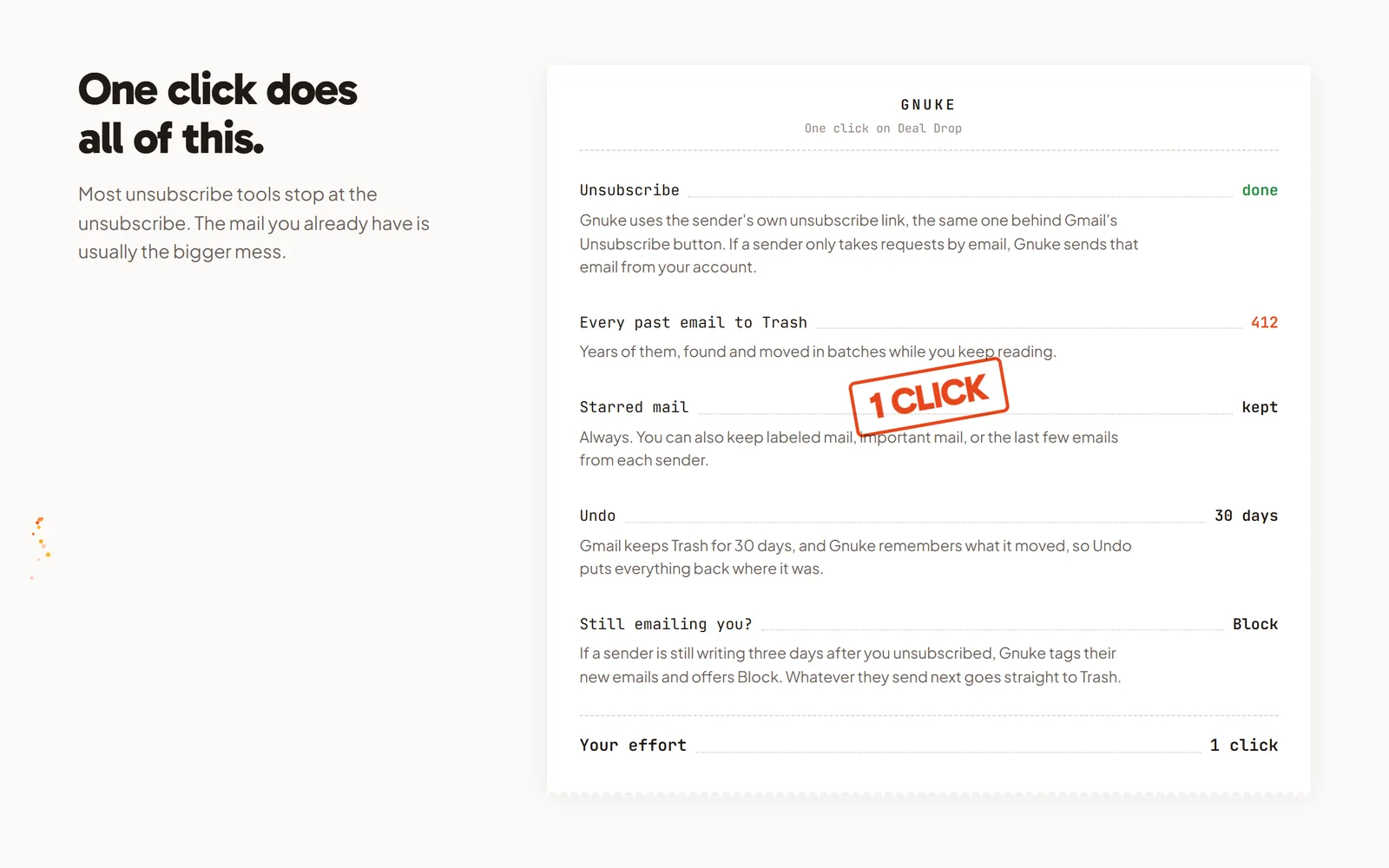
Food orders leave receipts, and you may need one for an expense report or a refund. Starred mail always stays, so star those before you click. You can also keep the sender's newest 1, 3 or 10 emails, mail in a label, or mail marked important. Undo brings everything back for 30 days, and Gnuke never deletes anything permanently. See how it works.
If DoorDash keeps mailing more than 3 days after you unsubscribed, Gnuke's "Still emailing you" list flags it and offers a one-click Block, a Gmail filter that sends future mail from that sender straight to Trash. For a bigger cleanup, Clean up ranks all your newsletter and promo senders so you can tick DoorDash alongside the rest and nuke them together. On your phone, the Gnuke phone app does the same thing straight to Gmail.
Gnuke works from your own browser or phone, and no Gnuke server sees your mail. Ten nukes a month are free; Unlimited is $29.99 a year or $4.99 a month (see pricing).
Which DoorDash fix fits#
If you still order from DoorDash, use the Unsubscribe link for email and the app's Notifications toggles for push, and leave Order Updates on. If you've stopped ordering, Gmail's Unsubscribe or Manage subscriptions will stop the offers without visiting DoorDash at all. Deleting the account is the only way DoorDash names to stop its order and account email. None of these clears your inbox. Gnuke stops the offers and moves every old DoorDash email to Trash in the same click.
Frequently asked questions
How do I stop DoorDash promotional emails?
Open any DoorDash email and click Unsubscribe at the bottom. It takes you to your email preferences, where you can uncheck single email types or opt out of all non-high-priority communications, then click Save Preferences. That's the route in DoorDash's help center, checked October 2026.
Why do I still get DoorDash emails after unsubscribing?
The opt-out covers promotional and marketing email. DoorDash's Consumer Terms treat any message about an order as transactional, and say the only way to stop transactional or relationship email is to delete your account. DoorDash's help center, privacy policy and terms give no time frame for an opt-out; Google asks bulk senders to Gmail to honor unsubscribe requests within 48 hours.
Can I change DoorDash email settings on doordash.com?
DoorDash's help center, privacy policy and terms describe two routes for customers: the Unsubscribe link in a DoorDash email, which opens your email preferences in a browser, and the Notifications settings in the app. None of them describes a separate email settings page on doordash.com, so the Unsubscribe link is the way to do it from a computer.
How do I stop DoorDash text messages?
For marketing texts, reply STOP to one of them or text STOP to 63758. For order update texts, DoorDash's terms say you can toggle them off in your account settings, reply STOP, or send STOP to 87424. Its help center recommends keeping Order Updates on, and says your Dasher can still message you about an order either way.
Will I still get DashPass emails?
Membership mail, yes. DoorDash's help center says you get an email confirming a DashPass cancellation, and its terms say DoorDash will notify you before renewal if it changes the DashPass fee. Those are about your membership, while DoorDash's opt-outs are written for promotional and marketing email.
Does unsubscribing from DoorDash delete the emails I already have?
No. Opting out only stops future marketing mail. Every DoorDash email already in Gmail stays until you delete it. Gnuke unsubscribes you and moves every DoorDash email to Gmail's Trash in one click, with Undo for 30 days.