 Gnuke
Gnuke Instacart sends two kinds of email, and you probably want only one of them. Receipts and order updates are worth keeping. The flyers and sale alerts are what fill the inbox. Instacart's notification settings can switch the promotional side off and leave the order mail alone. What they won't do is clear the promos you already have. Below is each route, with Instacart's steps taken from its own help center and Terms in October 2026. This is the customer side of Instacart. If you deliver for Instacart as a shopper, your messages aren't covered here.
Switch off Instacart's Marketing updates email#
Instacart's help center covers this on a page called Updating notifications and email settings (checked October 2026). It gives two ways to reach your notification settings:
- On the website, click the three horizontal lines in the upper left corner, click Your account settings, then select Notification settings.
- In the app, tap the Account icon in the upper right corner, tap Settings, then select Notifications under App settings.
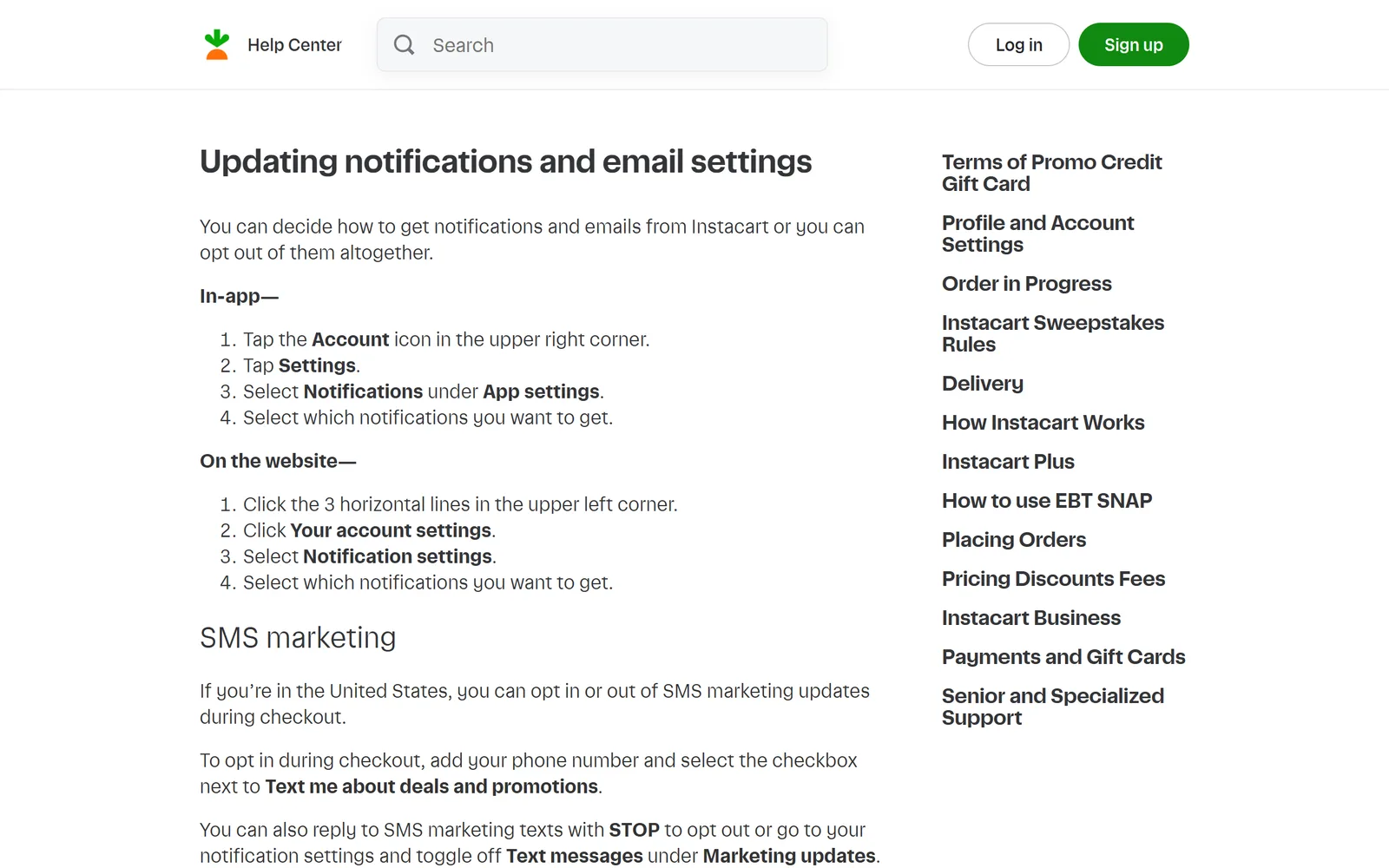
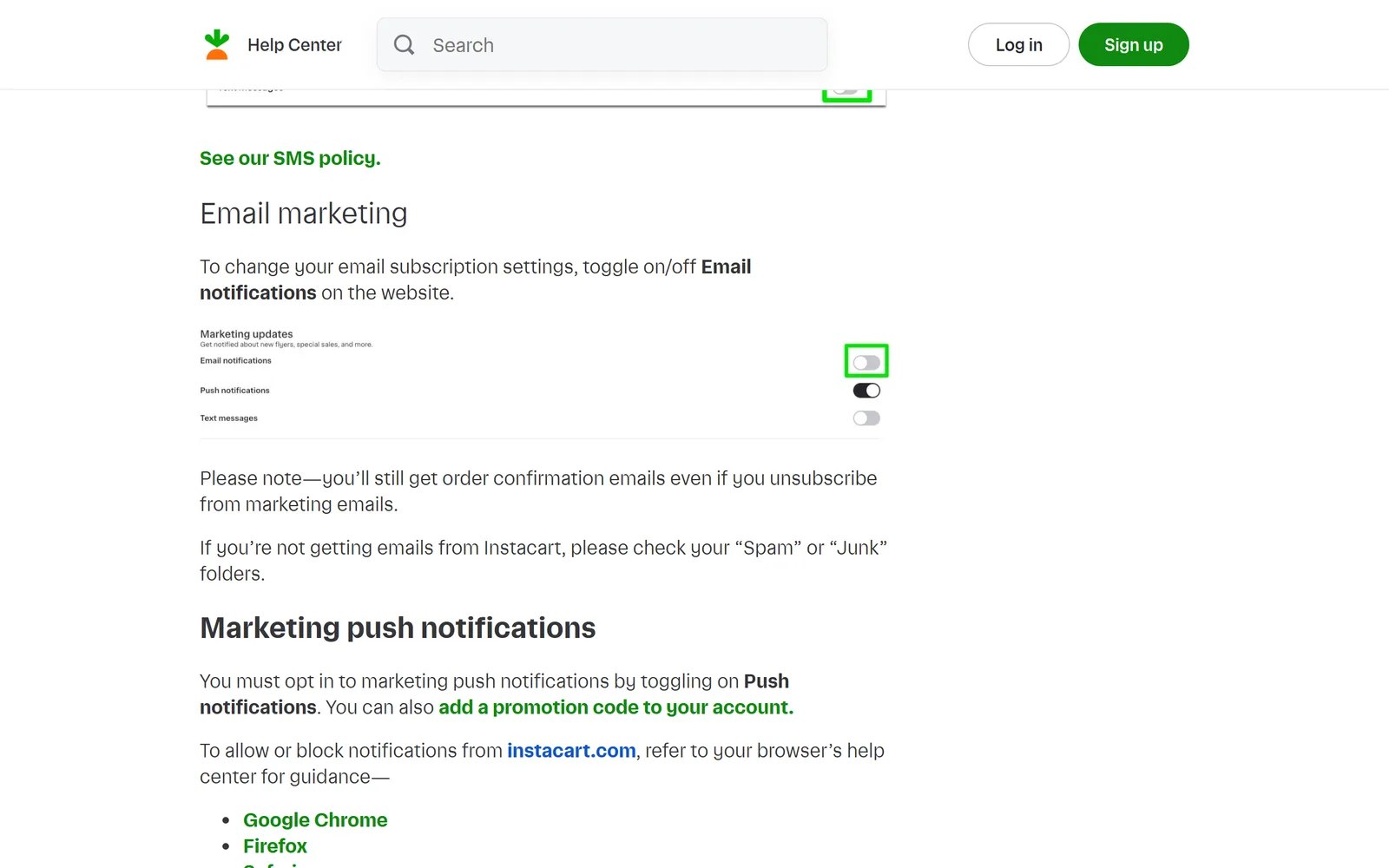
For email specifically, the same page says to "toggle on/off Email notifications on the website." That puts the email switch on instacart.com, so do this part signed in on the website, from a computer or your phone's browser. The page's own picture of the settings shows a section called Marketing updates, described as "Get notified about new flyers, special sales, and more," with three switches in it: Email notifications, Push notifications and Text messages.
Or use the opt-out in an Instacart email#
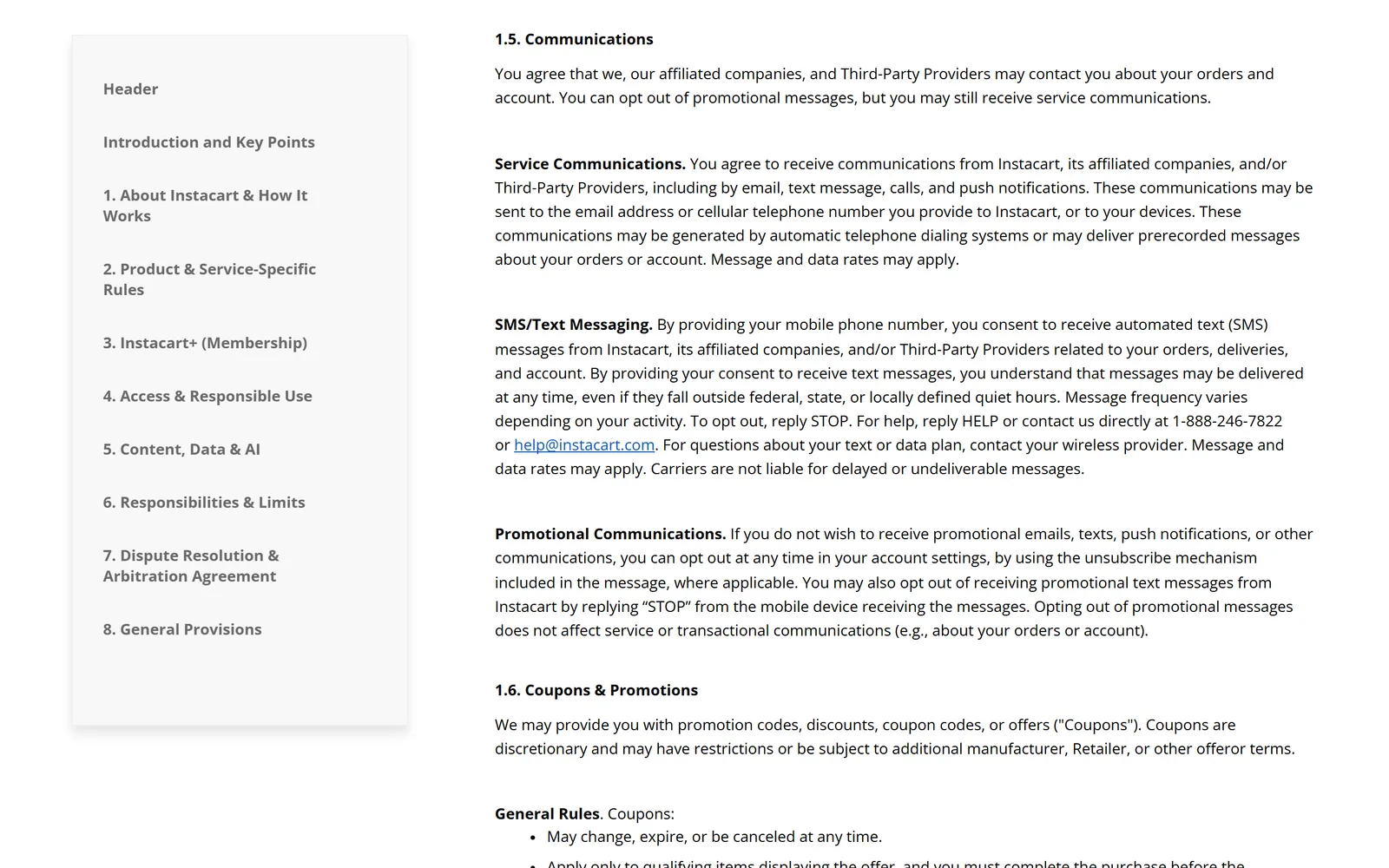
You don't have to sign in. Instacart's privacy policy (last updated January 15, 2026) says, under Your Marketing Choices, that you can opt out of its marketing "by following the opt-out instructions included in any communication that you receive from us or by visiting your Account Settings." Section 1.5 of its Terms (last updated May 7, 2026) says the same, pointing to account settings or "the unsubscribe mechanism included in the message, where applicable."
Texts and push notifications#
Texts and push have their own switches in the same Marketing updates section. To stop marketing texts, the help page says to reply STOP to one or toggle off Text messages under Marketing updates. In the United States there's also a checkbox at checkout, Text me about deals and promotions. That box is how you opt in, so leave it unticked.
Marketing push notifications work the other way around: the help page says you have to opt in by toggling on Push notifications, so they're off unless you turned them on.
Leave the order switches alone. Instacart texts you about your order's status automatically, and the help page warns that if you turn off all notifications for order updates, "you won't get any alerts about the status of your order, including replacements and refunds."
Which Instacart emails keep coming after you opt out?#
The marketing switch is for marketing only. Instacart's help page puts it in one line: "you'll still get order confirmation emails even if you unsubscribe from marketing emails." Section 1.5 of the Terms goes further and says opting out of promotional messages "does not affect service or transactional communications (e.g., about your orders or account)."
That split matters for Instacart+. An offer to join is a promotion like any other. Notices about a membership you already pay for are account messages: section 3 of the Terms says Instacart will notify you before renewal if the fee goes up, and may change other membership terms with notice. Those keep coming after you switch marketing off.
On timing, Instacart's help page, privacy policy and Terms give no time frame for an opt-out to apply.  Google's sender guidelines require anyone sending 5,000 or more messages a day to
  Gmail to offer one-click unsubscribe, and Google's sender FAQ lists unsubscribe requests not honored within 48 hours as a reason it withholds delivery support. If promos are still arriving a few days later, go back to Notification settings on the website and check that Email notifications is still off.
Ordering takeout too? Here's how to unsubscribe from  DoorDash emails and from
  Uber Eats emails.
Gmail's Unsubscribe and Manage subscriptions#
Gmail can stop new Instacart promos without you visiting Instacart at all. Many marketing emails show an Unsubscribe link next to the sender's name at the top of the message. And Manage subscriptions (in the left menu under More on the web, or the top-left menu in the phone app) lists the senders that mail you most, with an Unsubscribe button for each. Google's help page covers it, and our guide to unsubscribing in bulk in Gmail walks through it.
Both stop new mail. Neither deletes anything: every Instacart promo you already have stays in your inbox. For how Manage subscriptions compares with a tool that clears the backlog too, see  Gnuke vs Gmail's Manage subscriptions.
Clear out the Instacart emails already in Gmail#
No unsubscribe link touches what's already there. You can clear it by hand: search Gmail for the Instacart sender with from:, select every matching conversation, and delete them, as our guide to deleting all emails from one sender shows step by step.
Or do both jobs in one click. Gnuke is a  Chrome extension that adds a bomb button to Gmail. Click it on an Instacart promo and Gnuke unsubscribes you in the best way the sender supports: the standard one-click request if it's there, otherwise an unsubscribe email from your own address, otherwise it opens the sender's unsubscribe page for you. In the same click, every email from that sender moves to Gmail's Trash.
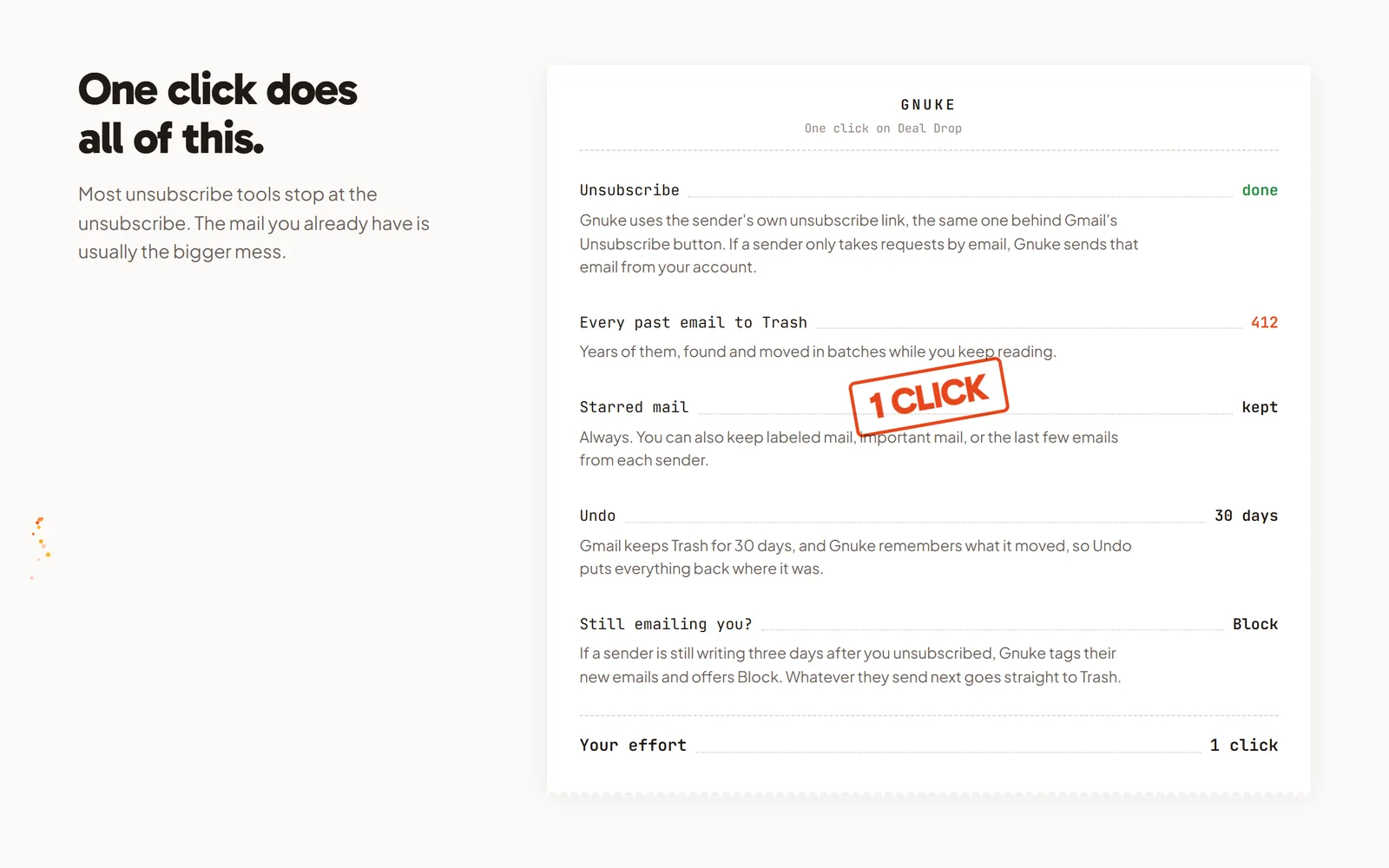
Think about receipts before you click. If your order confirmations come from the same address as the promos, one click takes them too, so star the receipts you might need for a refund or an expense report before you click. Starred mail always stays. You can also keep the sender's newest 1, 3 or 10 emails, mail in a label, or mail marked important. Undo brings everything back for 30 days, and Gnuke never deletes anything permanently. See how it works.
If Instacart keeps sending promos more than 3 days after you unsubscribed, Gnuke's "Still emailing you" list flags it and offers a one-click Block, a Gmail filter that sends future mail from that sender straight to Trash. Look at the From address on a recent receipt before you block: if it matches the promos, the filter catches your receipts too. For a bigger cleanup, Clean up ranks all your newsletter and promo senders so you can tick Instacart alongside the rest and nuke them together. On your phone, the Gnuke phone app does the same thing straight to Gmail.
Gnuke works from your own browser or phone, and no Gnuke server sees your mail. Ten nukes a month are free; Unlimited is $29.99 a year or $4.99 a month (see pricing).
Which Instacart opt-out fits you?#
If you still order from Instacart, the Marketing updates switches in Notification settings are the best fix: email, texts and push sit side by side, and your order confirmations keep arriving. If you've stopped using Instacart, the opt-out in any promo email or Gmail's Manage subscriptions will stop new mail without signing in. None of them empties your inbox. Gnuke stops the promos and clears every old Instacart email in the same click, with your starred receipts left where they are.
Frequently asked questions
How do I stop Instacart emails?
Sign in at instacart.com, open the menu at the top left, click Your account settings, then Notification settings, and toggle off Email notifications under Marketing updates. Instacart's help center says that email switch is on the website. You can also follow the opt-out instructions in any Instacart marketing email. Checked October 2026.
Will I still get Instacart order confirmation emails if I unsubscribe?
Yes. Instacart's help center says you'll still get order confirmation emails even if you unsubscribe from marketing emails, and its Terms say opting out of promotional messages doesn't affect messages about your orders or account.
How do I stop Instacart text messages?
Reply STOP to a marketing text, or go to your notification settings and toggle off Text messages under Marketing updates. Order status texts have their own Text messages switch under Order updates; Instacart warns that turning off all order notifications means no alerts about your order, including replacements and refunds.
How do I turn off Instacart push notifications?
Instacart's help center says marketing push notifications are opt-in: you only get them if you toggled on Push notifications under Marketing updates. Toggle that switch off in the same section to stop them.
How long does it take for Instacart to stop emailing me?
Instacart doesn't say. Its help page, privacy policy and Terms give no time frame. Google's sender guidelines require bulk senders to Gmail to offer one-click unsubscribe, and Google's sender FAQ lists unsubscribe requests not honored within 48 hours as a reason it withholds delivery support.
Does unsubscribing from Instacart delete the emails I already have?
No. Turning off marketing email only stops future promos. Every Instacart email already in Gmail stays until you delete it. Gnuke unsubscribes you and moves every email from that sender to Gmail's Trash in one click, with Undo for 30 days, and starred mail stays.