 Gnuke
Gnuke Shein's coupon and flash-sale emails can arrive faster than anyone opens them. Here is where Shein puts the off switch, what keeps arriving after you flip it, and how to get rid of the Shein emails already sitting in
  Gmail. We checked every step against Shein's own pages in October 2026.
Turn off Shein email in Contact Preferences#
Shein keeps its email, text and WhatsApp marketing switches on one page called Contact Preferences. Shein's Privacy Center (the UK and EU editions) puts it under Settings, and the US Contact Preferences page itself says to "log into your SHEIN User Account, click on 'Contact Preferences' and toggle off the button."
In the Shein app:
- Tap the person icon at the bottom right. That's your account.
- Tap the gear icon at the top right to open Settings. Shein's self-service tools page describes these first two taps.
- Choose Contact Preferences.
- Turn off the Email switch.
On a computer, sign in at us.shein.com and go to us.shein.com/user/notification. That is the same Contact Preferences page.
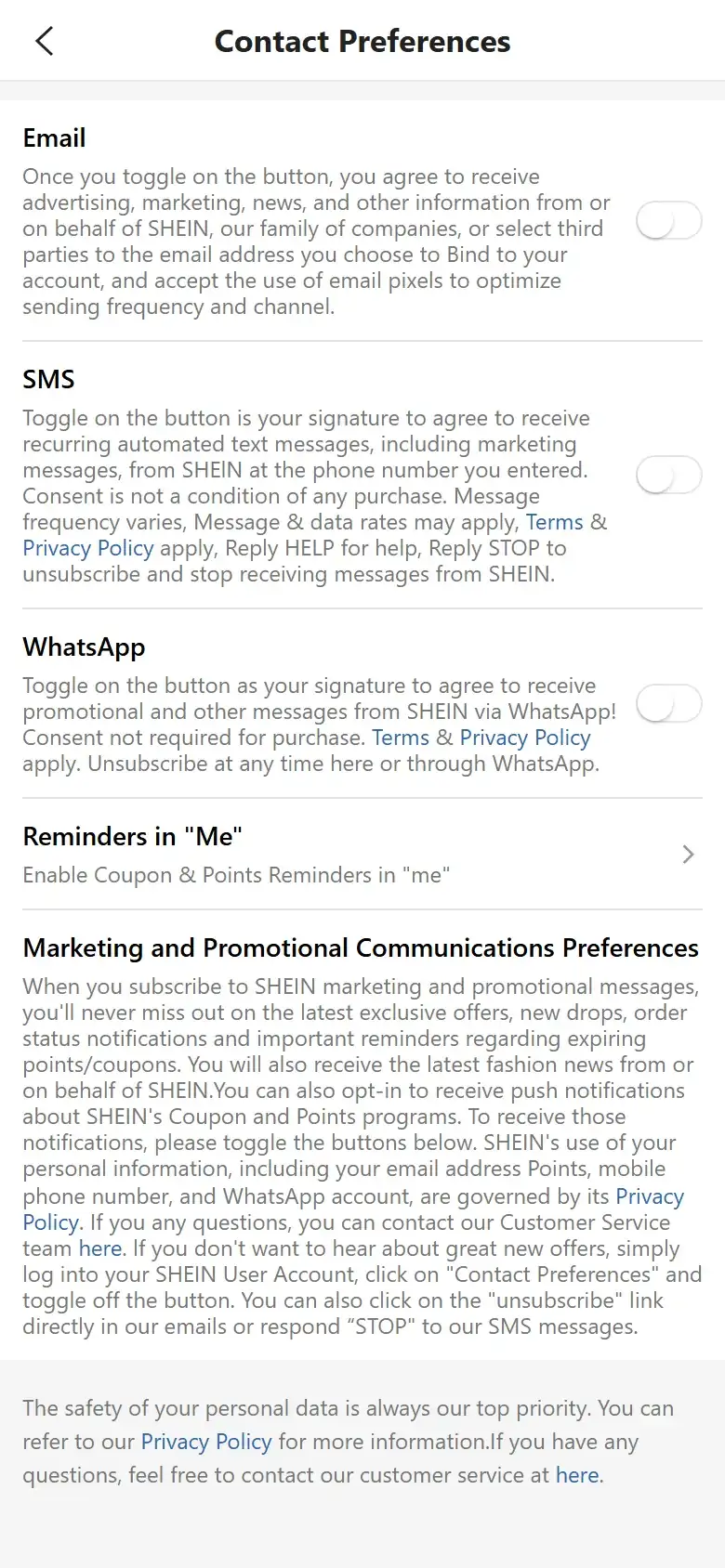
Read the fine print under the Email switch. Turning it on means agreeing to "advertising, marketing, news, and other information from or on behalf of SHEIN, our family of companies, or select third parties," and to email pixels. So that one switch covers Shein, its sister companies and some partners. SMS and WhatsApp have switches of their own, so turn those off too if Shein reaches you there.
Or click Unsubscribe in any Shein email#
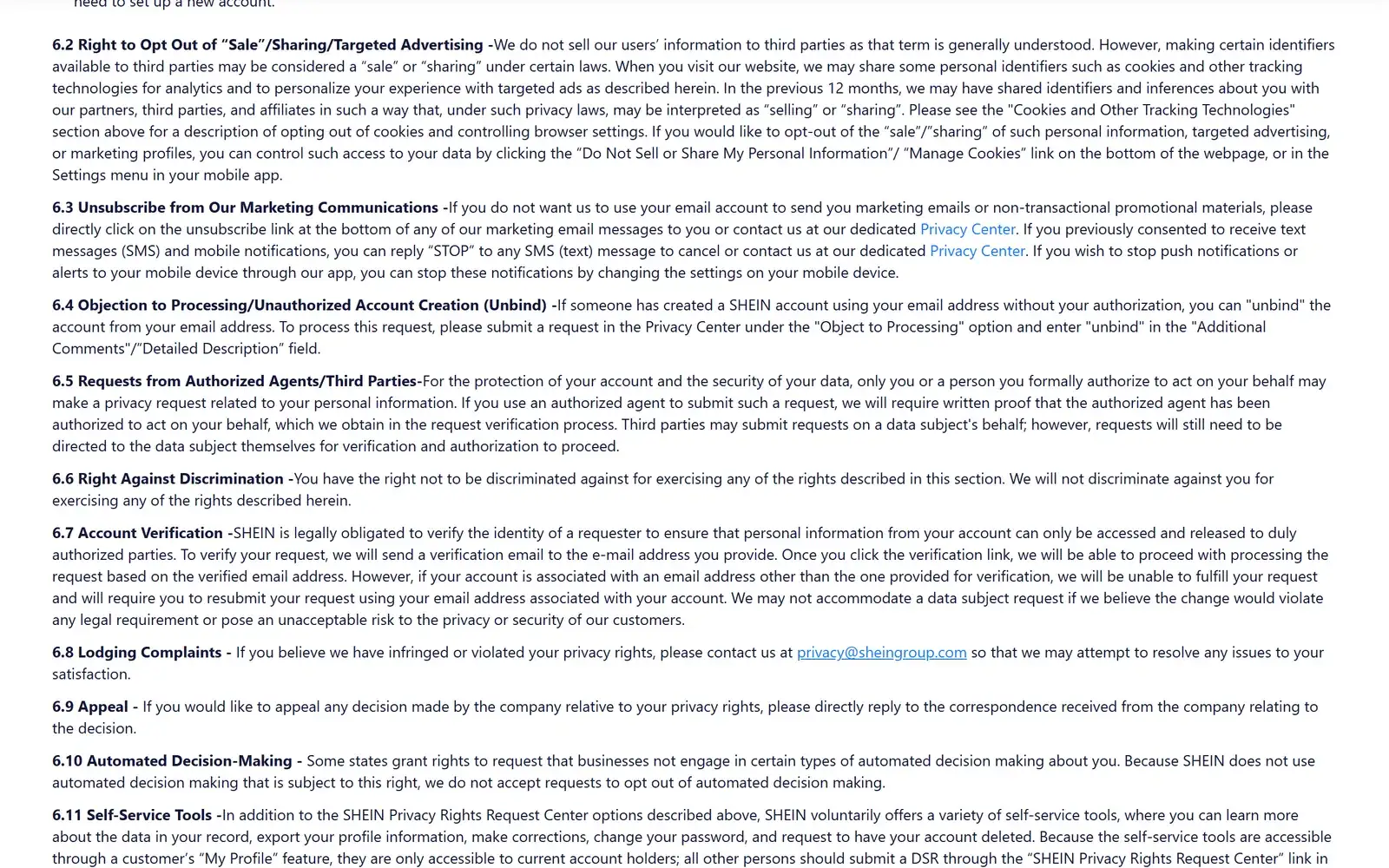
Shein's US privacy notice (effective September 10, 2026) lists the email link first. Section 6.3 says to "directly click on the unsubscribe link at the bottom of any of our marketing email messages," or to contact Shein's Privacy Center. The same section covers the other channels:
- Texts: reply "STOP" to any Shein text message.
- Push notifications from the app: change the notification settings on your phone.
No Shein account? Then the link is the way to go. Shein's Privacy Center says so directly: without an account, use the link at the bottom of the marketing email.
What unsubscribing doesn't stop#
Order mail keeps coming. Shein's US notice scopes the opt-out to "marketing emails or non-transactional promotional materials," and elsewhere says it uses your contact details for "keeping you informed of the order status and shipping logistics." The UK and EU Privacy Center is more blunt: Shein keeps contacting you about your order, or when the law requires it, and the way to stop that is to delete your account.
The Contact Preferences page muddies this a little. Its blurb lists "order status notifications" among the perks of subscribing to marketing. Shein doesn't say which order messages hang off that switch. Expect confirmations and shipping updates to keep coming either way.
As for timing, the UK and EU Privacy Center says the change can take up to 24 hours to reach Shein's systems, and you might get marketing email in the meantime. The US notice gives no time frame.
And none of this touches the backlog. Every coupon blast and flash sale Shein has already sent stays in your inbox.
Gmail's Unsubscribe and Manage subscriptions#
Gmail gives you two built-in shortcuts. On many marketing emails Gmail shows an Unsubscribe link next to the sender's name at the top of the message, and Gmail's Manage subscriptions page (left menu, More, Manage subscriptions on the web) lists your senders by how often they write. Click Unsubscribe there and Gmail sends the request for you. Our guide to unsubscribing in bulk walks through it.
Both stop new mail only. Every Shein email you already received stays where it is. Clearing those means a search for the sender, a select-all and a delete, the routine in our guide to deleting all emails from one sender. For how the two tools differ, see  Gnuke vs Gmail's Manage subscriptions.
Clear out the Shein pile with Gnuke#
Gnuke is a  Chrome extension that adds a bomb button to Gmail. Click it on Shein and it does both jobs in one go.
First, it unsubscribes you in the best way Shein's email supports. When the sender supports the standard one-click request, Gnuke sends it. If not, it sends the unsubscribe email from your address. If that doesn't apply either, it opens the sender's unsubscribe page for you. The receipt tells you which one happened.
Second, it moves every email Shein ever sent you to Gmail's Trash. You don't have to search for them or page through years of promos.
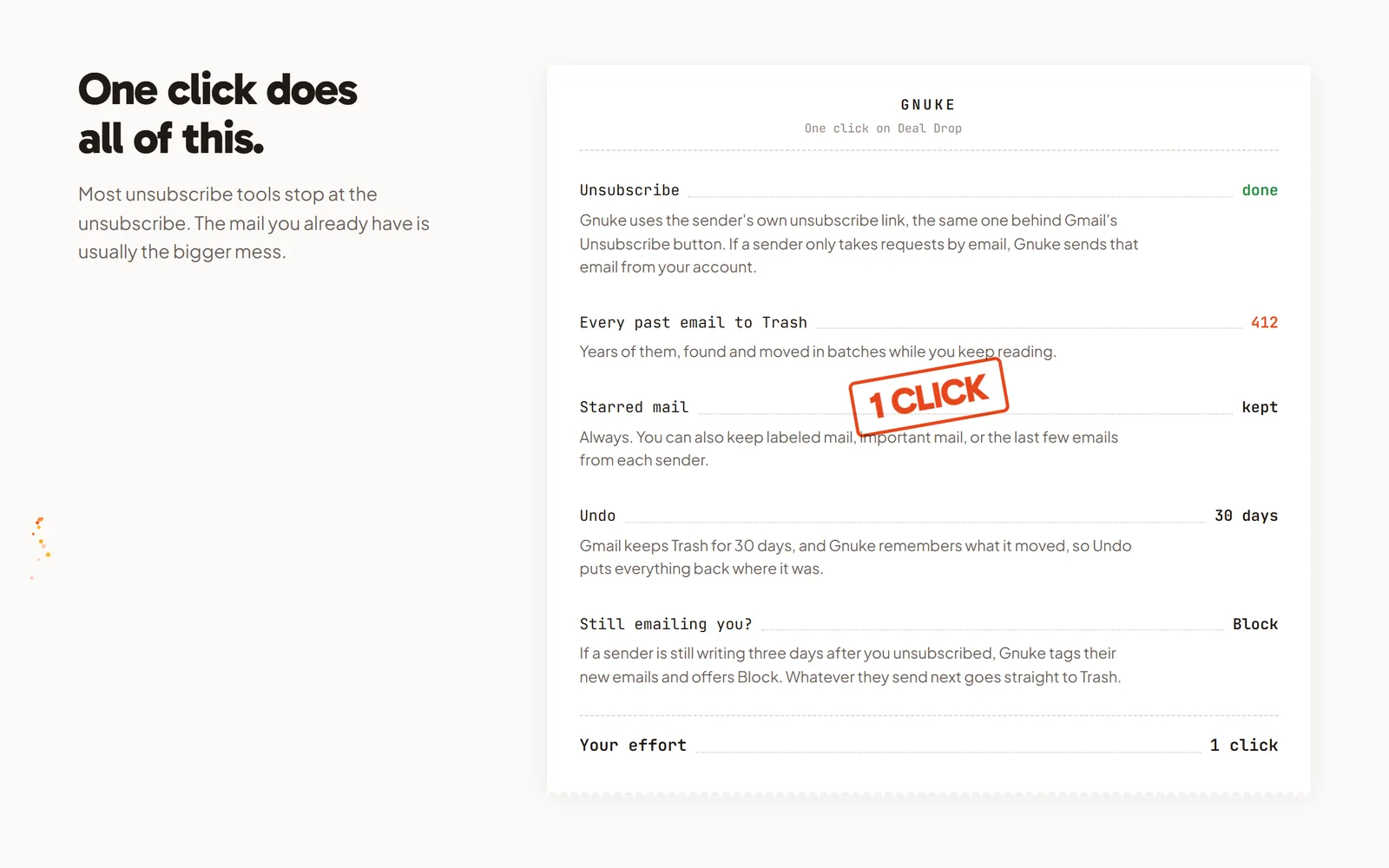
Starred mail always stays. You can also keep mail you've put in a label, mail marked important, and Shein's newest 1, 3 or 10 emails, which is handy if a recent order confirmation is in there. Undo for 30 days brings everything back, and Gnuke never deletes anything permanently.
If Shein keeps writing more than 3 days after you unsubscribed, "Still emailing you" flags it and offers a one-click Block, a Gmail filter that sends its future mail straight to Trash. Clean up scans your newsletters and promos and ranks senders by how many emails they sent and how often you open them, so you can tick Shein and any other store that fills your inbox and nuke them together.  Temu has its own settings, covered in how to unsubscribe from Temu emails.
The phone app does the same from your phone. You get 10 nukes a month free, and Unlimited is $29.99 a year or $4.99 a month (pricing). Gnuke works from your browser or phone, and no Gnuke server sees your mail. See how it works.
Which route fits you#
If you want Shein's promos gone and don't care about the old ones, switch off Email in Contact Preferences or click the link in one email. That takes a minute. If your inbox already holds years of Shein emails, Gnuke unsubscribes you and clears the pile in one click, and order confirmations you star or keep stay put.
Frequently asked questions
How do I stop Shein emails if I don't have an account?
Click the Unsubscribe link at the bottom of any Shein marketing email. Shein's Privacy Center names that link as the route for people without an account, and its US privacy notice lists it first for everyone.
Will I still get order and shipping emails from Shein?
Yes. Shein's US privacy notice limits the opt-out to marketing emails and non-transactional promotional material, and says it uses your contact details to keep you informed of order status and shipping.
How long does it take for Shein emails to stop?
Shein's UK and EU Privacy Center says the change can take up to 24 hours to reach its systems and that marketing email may keep arriving in the meantime. The US privacy notice, last updated September 10, 2026, gives no time frame.
How do I stop Shein texts and push notifications?
Reply STOP to any Shein text, or turn off SMS in Contact Preferences. For push notifications, Shein's US privacy notice says to change the notification settings on your phone.
Does unsubscribing delete the Shein emails I already have?
No. Shein's settings, the unsubscribe link and Gmail's Manage subscriptions only stop new mail. To clear the old Shein emails, search for them in Gmail and delete them, or use Gnuke, which trashes them and unsubscribes you in one click.