 Gnuke
GnukeThe  Quora Digest is the email most people want gone. Signing up is enough to start it: Quora's Privacy Policy says that when you create a profile, "you will receive email digests containing content from the Quora Platform that we believe may match your interests." The same policy mentions notices about other content too, such as Spaces you follow. Most of it switches off in one settings page, and a few emails keep coming whatever you do. The steps below come from Quora's public Help Center, checked October 2026, and the last section deals with the years of digests already sitting in
  Gmail.
Turn off the Digest in Email & Notifications#
Quora's Help Center article How do I control notifications and emails from Quora? gives one place for all of it, on the web and in the app.
On quora.com:
- Open your Settings page.
- Click Email & Notifications in the left-side menu. Quora's unsubscribe help article also gives the direct address,
quora.com/settings/notifications. - Turn off the digest and every other email type you don't want.
In the Quora app, tap your profile icon in the upper left, tap Settings, choose Email & Notifications, then choose Email. (The same screen has Push notifications, if the app is buzzing too.)
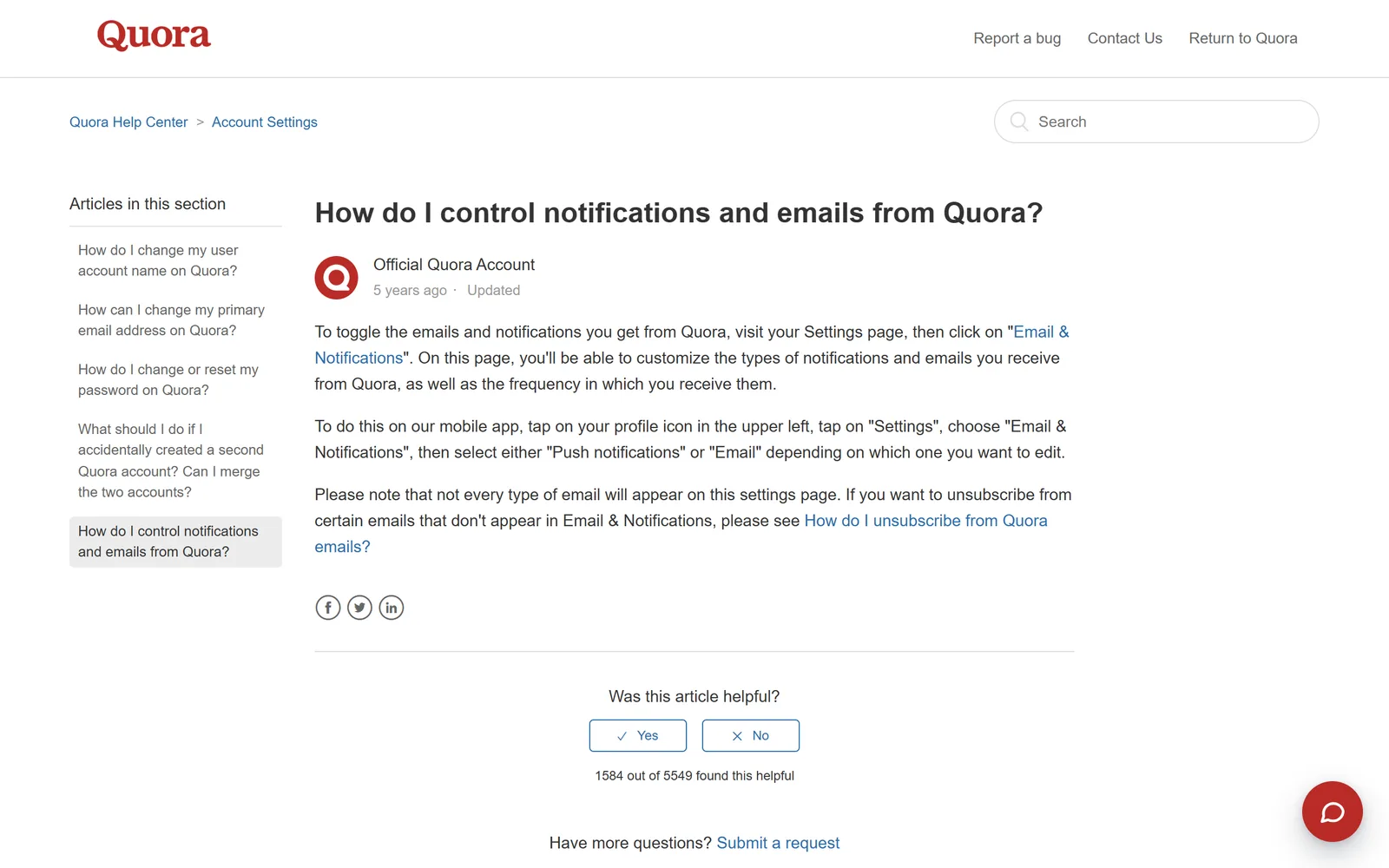
The help article doesn't list the switches by name, so plan to go down the page and turn off each type you don't want. Quora's help doesn't describe one switch that turns all email off; deactivating the account, covered below, is the closest thing. If you actually like the digest and just get too much of it, Quora says this page also lets you set how often each kind of email arrives, so you can keep it and get fewer.
Both help articles were last updated in mid-2021. They still match the settings path Quora's current Privacy Policy points to: you opt out of emails "by configuring your Emails and Notifications settings."
One unsubscribe link, one email type#
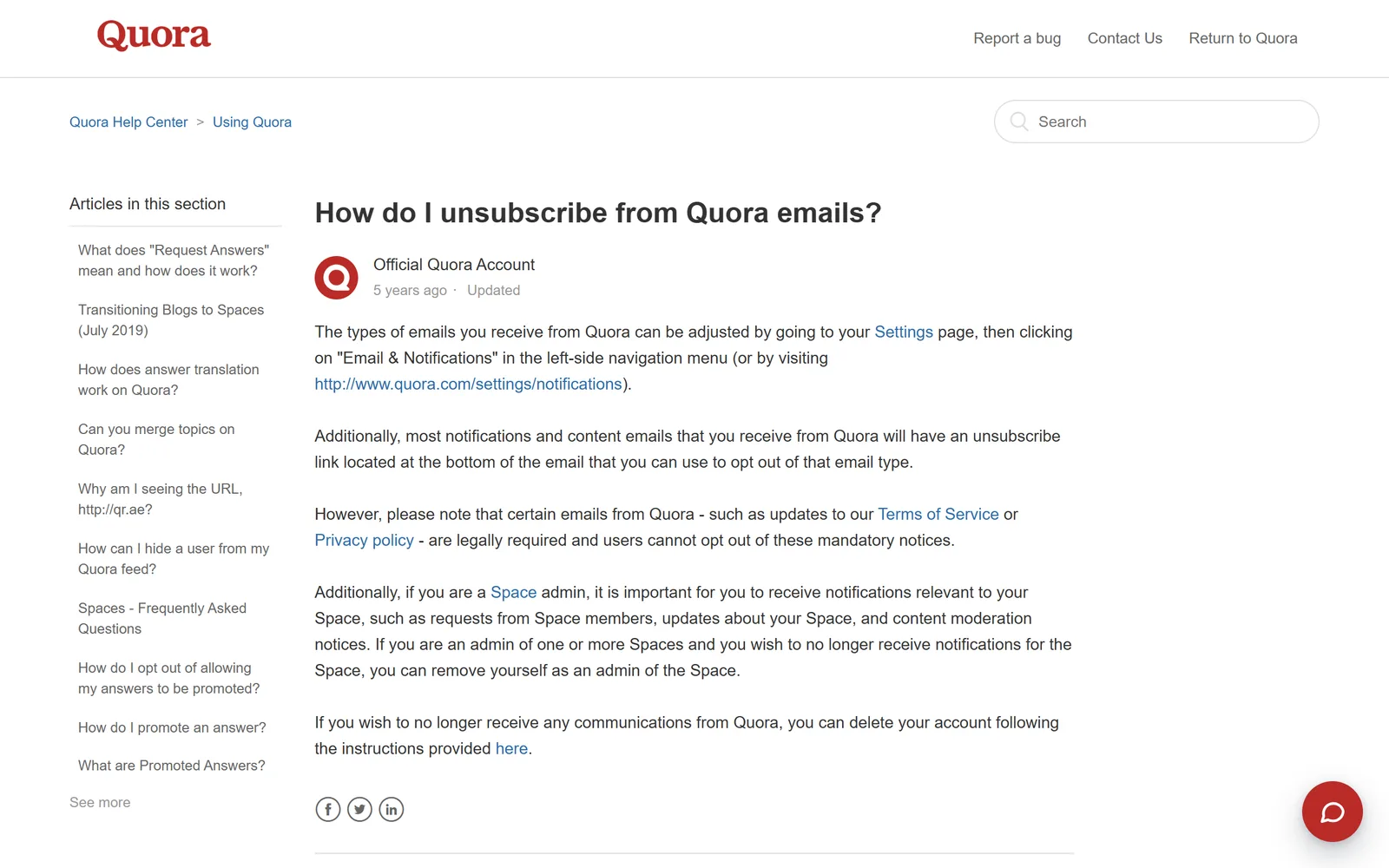
The quicker route is the link at the bottom of the email. Quora's unsubscribe help article says most notification and content emails carry one, and that it opts you out of "that email type." So unsubscribing from a digest stops digests. Every other kind of Quora email keeps coming until you click its own link, which is why the settings page is quicker if several kinds bother you.
The link also covers a gap in the settings page. Quora's help says not every type of email appears in Email & Notifications, and for those it points you to the unsubscribe link instead.
If the noise comes from one Space, Quora's Spaces FAQ has a per-Space control: the notification bell right below the Space title, with All Notifications, Highlights only (just the top-voted content) and Notifications off. The FAQ describes it as a notification setting and doesn't mention email, so use Email & Notifications for the emails themselves.
Which Quora emails keep coming?#
Account email, for one. The Your Choices and Settings section of Quora's Privacy Policy (effective August 25, 2023, still the live version in October 2026) says you can opt out of emails and notifications in your settings, "but we will still send you transactional emails about your account."
The unsubscribe help article names two more. Updates to Quora's Terms of Service or Privacy Policy are legally required, so nobody can opt out of those. And if you run a Space, Quora keeps sending requests from Space members, updates about the Space and content moderation notices. Quora's answer there is to remove yourself as an admin of the Space.
Want none of it? Deactivate. Quora's article on deactivating your account puts Deactivate Account at the bottom of the Privacy tab in Settings, and says you'll no longer receive any emails or notifications from Quora. Your answers stay on the site, and logging back in reactivates the account. Deleting the account also ends the emails, but Quora's comparison of the two says a deleted account can't be recovered and its content comes down, apart from community property such as questions, topics and Spaces. The Privacy Policy adds that deletion can take up to 14 days, and logging in during that window may reactivate the account.
On timing, we read Quora's Help Center articles on email, notifications and deactivation, plus the full Privacy Policy. None of them says how long an email opt-out takes.  Google sets the floor for big senders: anyone sending 5,000 or more messages a day to Gmail must support one-click unsubscribe, according to its sender guidelines, and its sender FAQ tells them to fulfill unsubscribe requests within 48 hours. If the digest is still arriving after a few days, go back to Email & Notifications and check that the switch stayed off.
Quora isn't the only social site that splits its email across several switches.  LinkedIn and
  Facebook do too: see our guides to unsubscribing from LinkedIn emails, unsubscribing from Facebook emails and stopping
  Pinterest emails.
Gmail's Unsubscribe and Manage subscriptions#
Gmail can also send the unsubscribe for you, without a Quora sign-in. Many marketing emails show an Unsubscribe option next to the sender's name at the top. Manage subscriptions (under More in Gmail's left menu on a computer) lists the senders that mail you most, each with its own Unsubscribe button. Google's Manage subscriptions help page says that unsubscribing there takes you off "all active mailing lists related to the sender," which may reach further than Quora's one-type-per-link footer. The same page warns it can take a few days for the sender to process it. Our guide to unsubscribing in bulk in Gmail walks through it.
Whichever button you press, the old mail stays. Every digest you got before unsubscribing is still in your inbox or archive. That's the gap we cover in  Gnuke vs Gmail's Manage subscriptions.
Clear years of Quora digests out of Gmail#
Unsubscribing deals with the next email. The backlog is a separate job. By hand, search Gmail for from:quora.com, select every matching conversation and delete them, as our guide to deleting all emails from one sender shows step by step.
Or do both jobs in one click. Gnuke is a  Chrome extension that adds a bomb button to Gmail. Click it on a Quora email and Gnuke unsubscribes you in the best way the sender supports: the standard one-click request if it's there, otherwise an unsubscribe email from your own address, otherwise it opens the sender's unsubscribe page for you. In the same click, every email from that sender moves to Gmail's Trash.
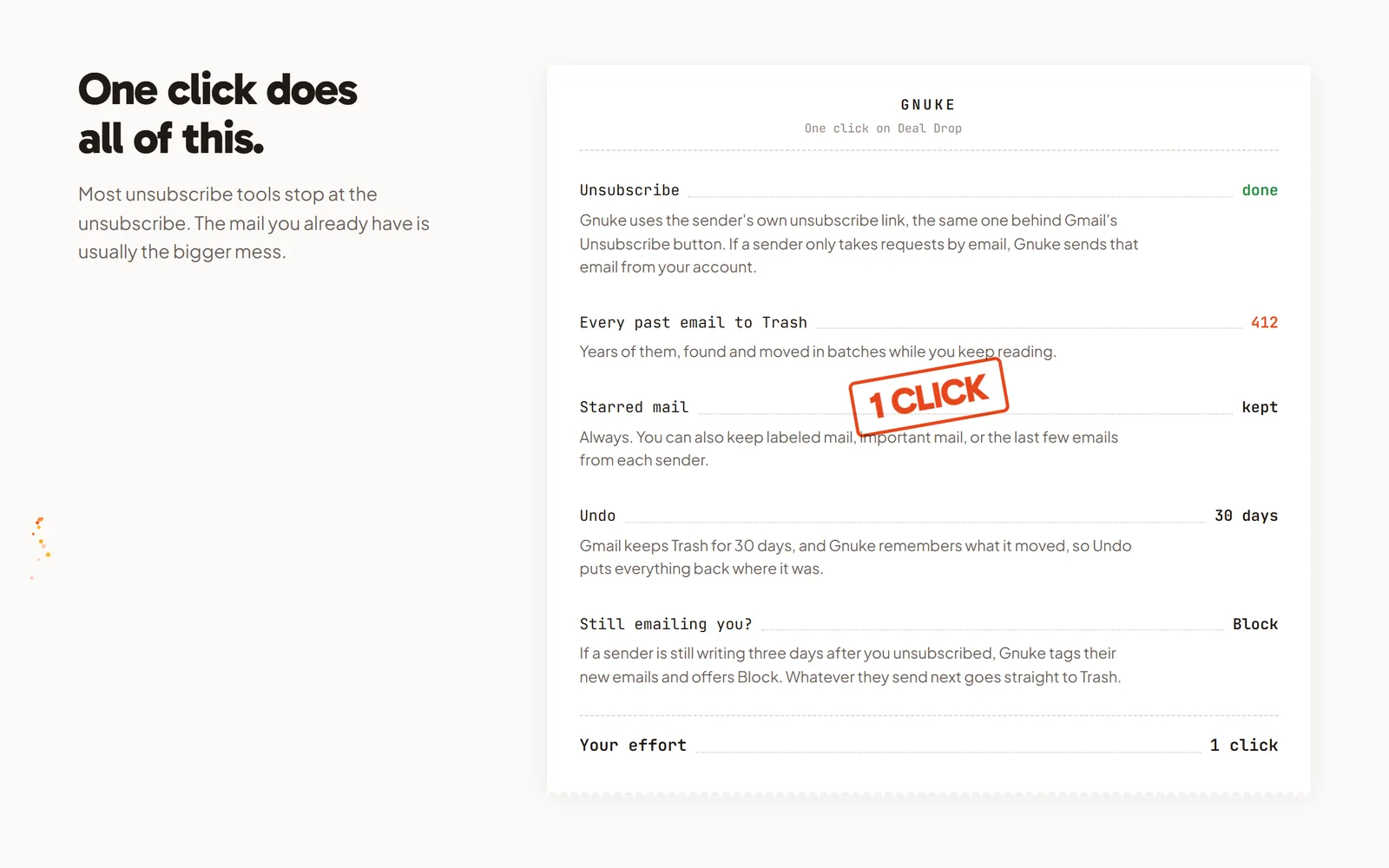
Saved a digest because one answer in it was good? Star it first. Starred mail always stays, and so does mail in a label or marked important. You can also keep the sender's newest 1, 3 or 10 emails. Undo brings everything back for 30 days, and Gnuke never deletes anything permanently. See how it works.
If Quora keeps mailing more than 3 days after you unsubscribed, Gnuke's "Still emailing you" list flags it and offers a one-click Block, a Gmail filter that sends future mail from that sender straight to Trash. For a bigger sweep, Clean up ranks all your newsletter and promo senders so you can tick Quora alongside the rest and nuke them together. On your phone, the Gnuke phone app does the same thing straight to Gmail.
Gnuke works from your own browser or phone, and no Gnuke server sees your mail. Ten nukes a month are free; Unlimited is $29.99 a year or $4.99 a month (see pricing).
Which way should you stop Quora's email?#
If you still read Quora, Email & Notifications is the thorough fix: you can switch off the digest and the alerts in one visit, or keep the digest and turn its frequency down. The unsubscribe link is fine for one email type at a time, and Gmail's Manage subscriptions works without signing in. If you've left Quora for good, deactivating stops every email. None of these touches the digests already in Gmail. Gnuke unsubscribes and clears every old Quora email in the same click.
Frequently asked questions
How do I stop Quora Digest emails?
On quora.com, open Settings, then Email & Notifications (or go to quora.com/settings/notifications) and turn off the digest along with any other email type you don't want. In the app, tap your profile icon, then Settings, Email & Notifications, then Email. You can also use the unsubscribe link at the bottom of a digest email, which stops that email type. Steps from Quora's Help Center, checked October 2026.
Why do I still get Quora emails after unsubscribing?
Each unsubscribe link only covers one email type, so a different type can keep coming. Quora's Privacy Policy also says it still sends transactional emails about your account after you opt out, and its Help Center says updates to the Terms of Service and Privacy Policy are legally required. Space admins keep getting notices about their Space until they remove themselves as admin.
Does the unsubscribe link in a Quora email stop all Quora email?
No. Quora's Help Center says the link at the bottom of most notification and content emails opts you out of that email type only. To switch off several types at once, use Email & Notifications in your settings.
How do I stop every email from Quora?
Deactivate your account. Quora's Help Center says deactivating, under Settings on the Privacy tab, stops all emails and notifications from Quora while your content stays on the site, and you can come back by logging in again. Deleting your account also ends Quora's emails but removes your content for good.
How long does a Quora unsubscribe take to work?
Quora's Help Center and Privacy Policy don't give a time frame. Google requires senders of 5,000 or more messages a day to Gmail to offer one-click unsubscribe, and its sender FAQ tells them to fulfill unsubscribe requests within 48 hours.
Does unsubscribing from Quora delete the emails I already have?
No. Quora's settings, its unsubscribe link and Gmail's Unsubscribe only stop future mail. Every Quora email already in Gmail stays until you delete it. Gnuke unsubscribes you and moves every Quora email to Gmail's Trash in one click, with Undo for 30 days.