 Gnuke
To bulk delete emails in  Gmail, use a computer: search for the mail you want gone, check the Select box above the list, click the link that selects all conversations, then click Delete. The phone app selects up to 50 messages at a time. Deleted mail sits in Trash for up to 30 days and takes up storage until it leaves.
Key takeaways
- The fastest free route is search, Select, "Select all conversations," Delete, on a computer.
- The Gmail app selects up to 50 messages at a time on
 Android and
 iPhone (
 Google).
- You have up to 30 days to rescue something from Trash. Empty it sooner and there's no undo.
- Deleting doesn't unsubscribe you. Stop the senders too, or the pile grows back.
Only here for one noisy sender? Go straight to deleting all emails from one sender.
How do I bulk delete emails in Gmail on a computer?#
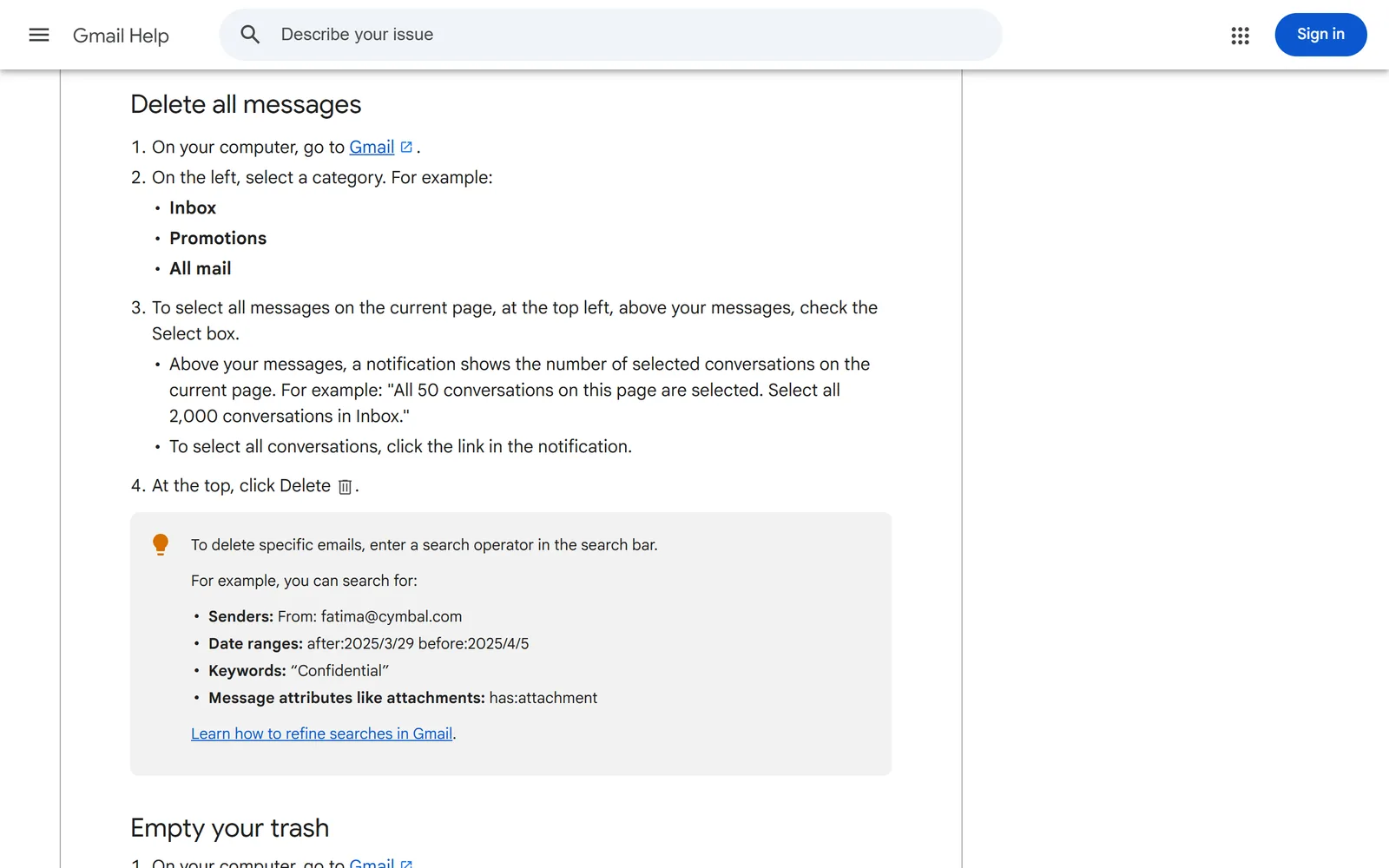
Google's Delete messages in Gmail page has the whole route. It takes four steps:
- Search for the mail, or pick a category on the left such as Inbox, Promotions or All mail.
- At the top left, above your messages, check the Select box. That selects the current page.
- Click the link in the notification above the list. This is the step people miss.
- At the top, click Delete.
Why does Gmail only select 50 emails?#
Because the box selects the page. Google's example of the notification reads "All 50 conversations on this page are selected. Select all 2,000 conversations in Inbox." Until you click that second half, you're deleting one page. Click it, and the delete covers every conversation in the category or search.
Which Gmail searches are worth knowing?#
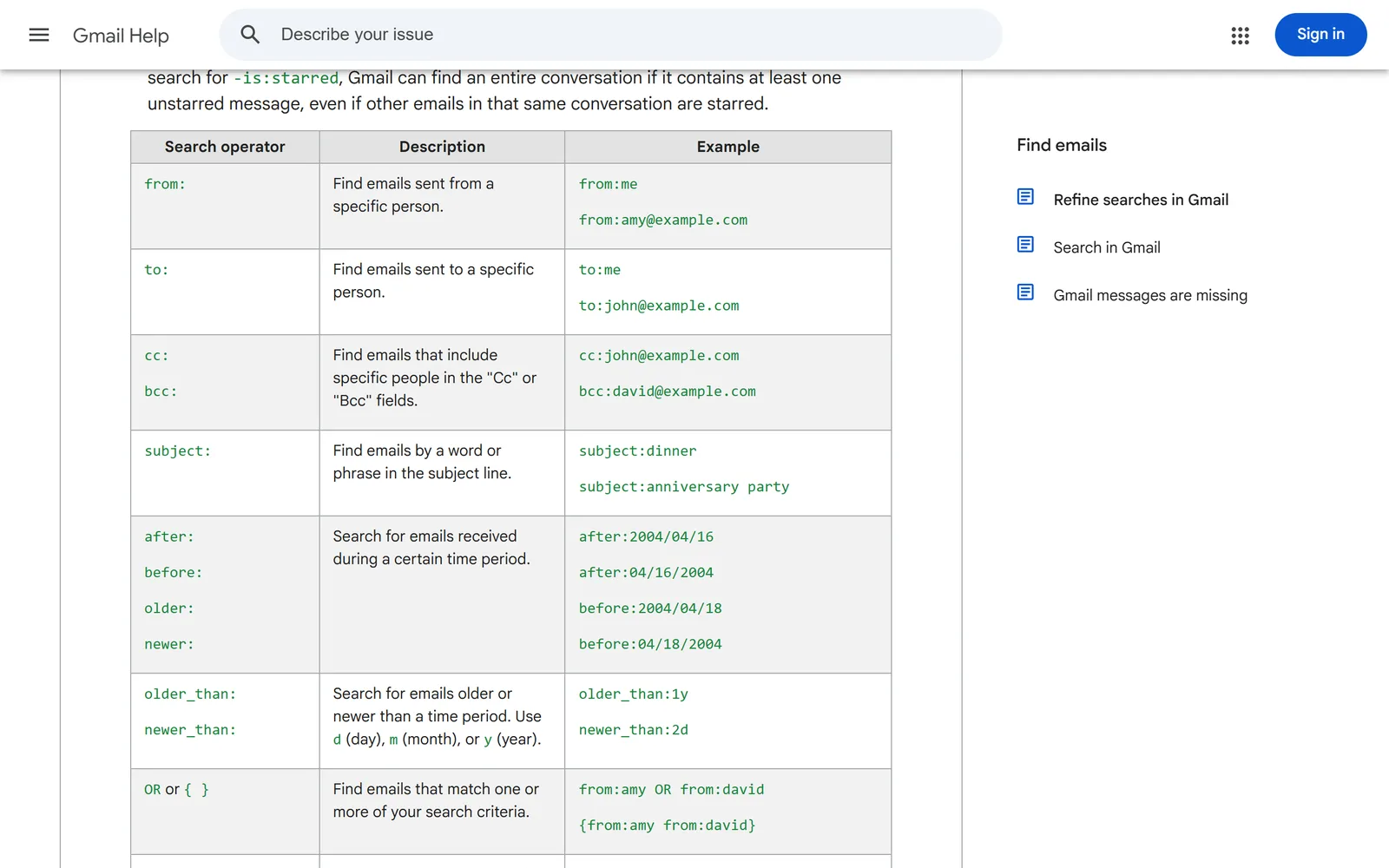
Deleting All mail is rarely what you want. These searches use operators from Google's search help and narrow the pile first.
| Search | What it finds |
|---|---|
category:promotions older_than:1y | What it findsPromotions more than a year old, if you use inbox categories |
category:social | What it findsMail Gmail sorted under Social |
older_than:3y | What it findsEverything more than three years old, personal mail included |
is:unread older_than:2y | What it findsUnread mail more than two years old |
has:attachment larger:10M | What it findsEmails over 10 MB with attachments |
label:newsletters | What it findsEverything under a label you named newsletters |
has:nouserlabels older_than:1y | What it findsYear-old mail you never put a label on |
before:2020/01/01 | What it findsEverything from before 2020 |
from:news@example.com | What it findsOne sender |
You can stack them: from:news@example.com older_than:1y keeps the recent year. Don't want to memorize any of this? Our free Gmail search builder writes the search from plain words and opens it in your Gmail. For a single sender, the one-sender guide also covers the filter that bins their future mail.
How do I mass delete emails in the Gmail app?#
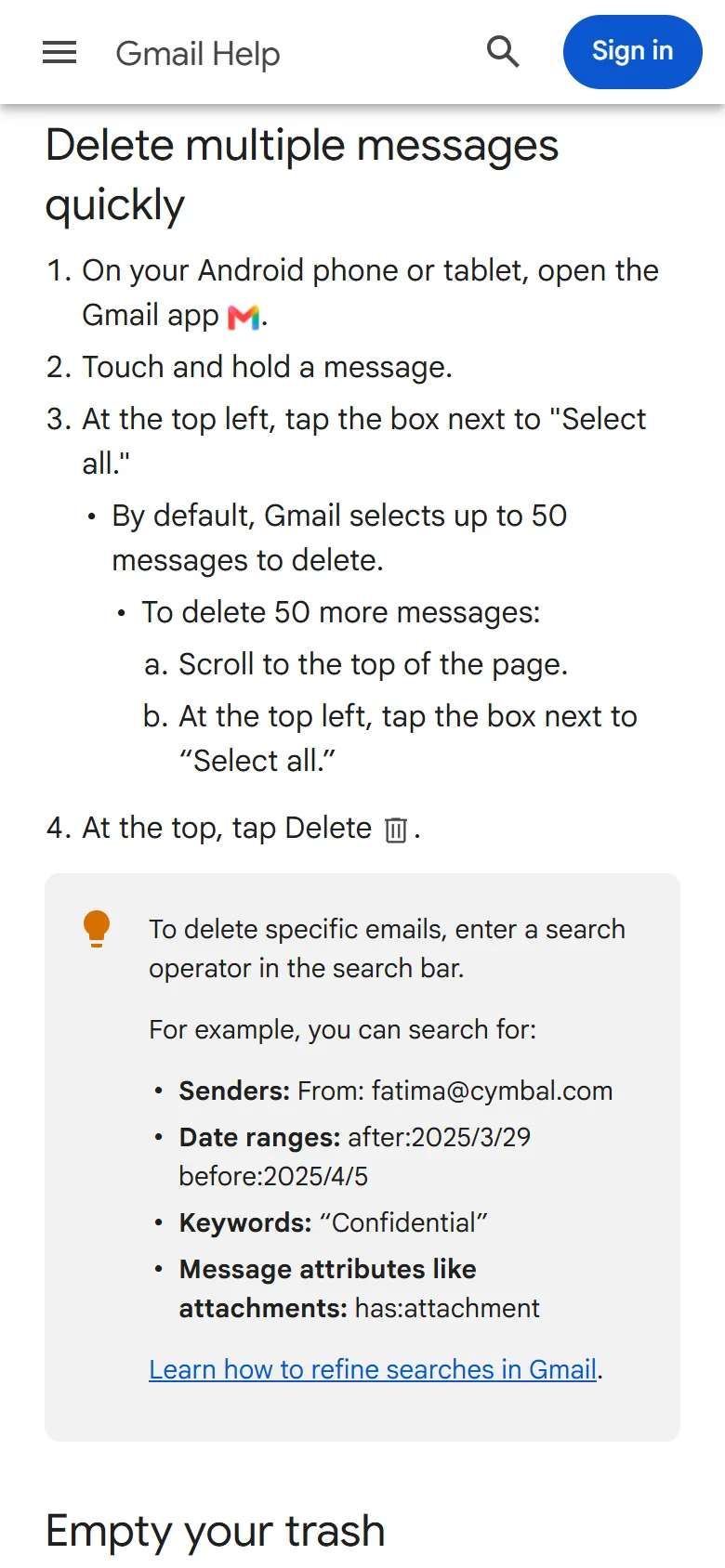
You can, but bring patience. Google's steps are the same on Android and iPhone:
- Open the Gmail app and touch and hold a message.
- At the top left, tap the box next to Select all. Gmail selects up to 50 messages by default.
- To add 50 more, scroll to the top and tap the Select all box again.
- At the top, tap Delete.
Search works in the app too, so run one of the searches above first. What Google's phone steps don't include is the computer's link to select every match. Two thousand promotions is 40 batches of 50 on a phone.
How do I empty Trash and get the storage back?#
Deleting moves mail to Trash, and Google's storage help says items in Trash and Spam count against your limit until you permanently clear them.
- On a computer, click More, then Trash, then Empty Trash now in the notification at the top.
- In the app, tap Menu, then Trash, then Empty trash now.
Look through it one last time before you do. If the number doesn't drop right away, wait: Google says to allow up to 48 to 72 hours after a big delete. A personal account gets up to 15 GB shared across Gmail, Drive and Photos, so our free Gmail storage checker is a good place to see where yours went.
What can go wrong with a bulk delete?#
Four things, all easier to avoid than to fix:
- Starred mail goes too. Adding
-is:starredhelps, butGoogle warns it can still return a whole conversation if one message in it isn't starred. - Labeled mail goes too. When you delete an email, Google says it's removed from every label as well as your inbox. Adding
-label:receiptsto the search narrows it, with the same conversation catch. - Attachments leave with the email. Download the ones you need before you clear
larger:10M. - An emptied Trash is final. Google says you can't recover a message after it's permanently deleted.
Deleted drafts are the odd one out: Google says you can't get those back from Trash at all.
Why does Gmail fill up again?#
You cleared the mail and left the senders. Every shop and app that mailed you last week still has your address.
So pair the delete with an unsubscribe. Gmail's Manage subscriptions lists senders with an Unsubscribe button for each, and our guide to unsubscribing in bulk walks through it. If a sender ignores you, block the address.
When does a tool help?#
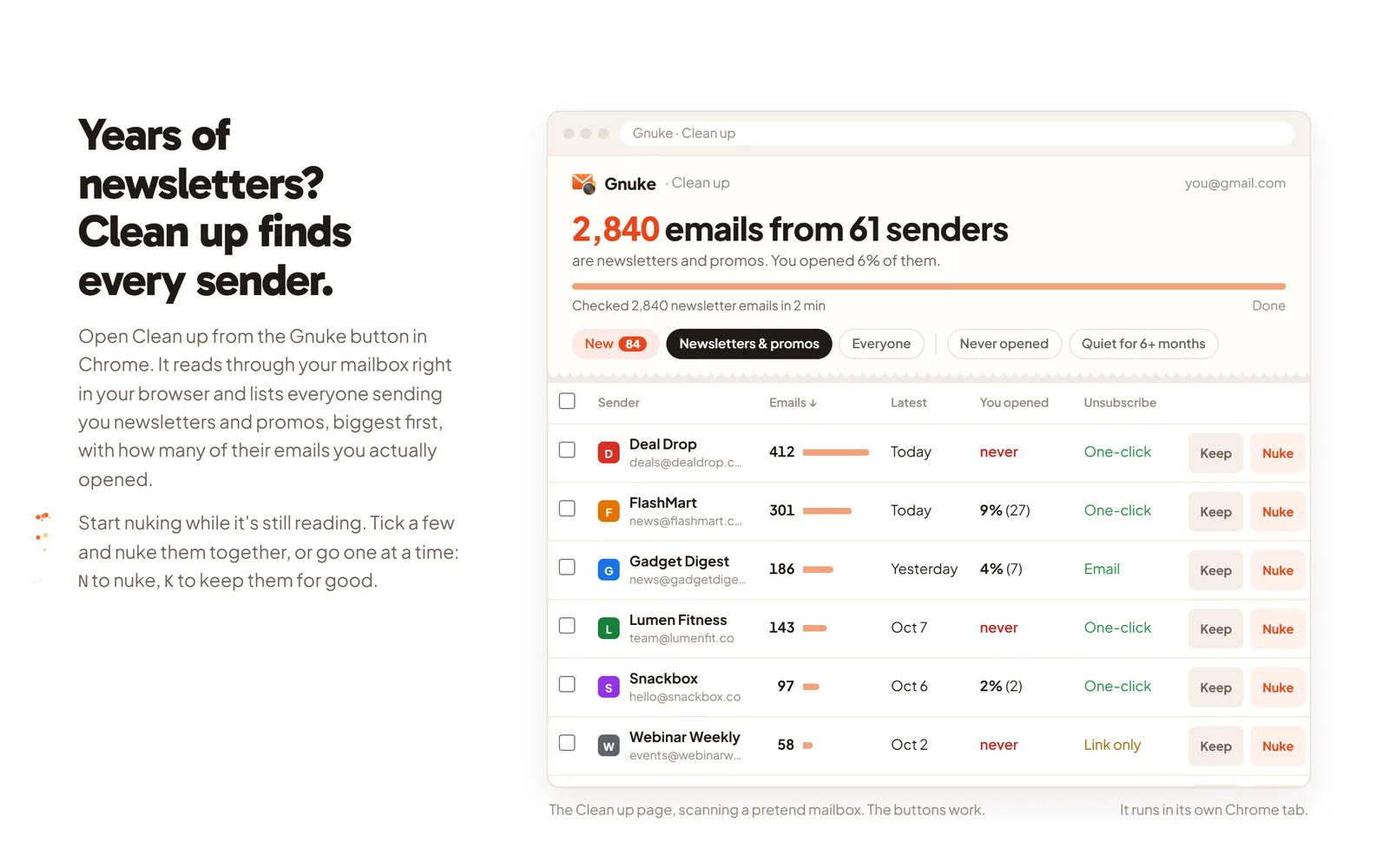
If it's the same few dozen senders filling your inbox,  Gnuke does both halves together. Click the bomb on a sender and Gnuke uses the sender's unsubscribe link, or sends an unsubscribe email from your account when the sender only takes requests by email. The same click moves that sender's past emails to Trash. Starred and labeled mail stays put, and Undo works for 30 days. Anyone still mailing you after that can be blocked.
Clean up lists your newsletter senders so you can work through them in one sitting. Your email content stays on your device. Gnuke works per sender, so for a sweep by age or size, use the searches above. There's a phone app as well, and here's how Gnuke works.
Which bulk delete method should you use?#
| Method | Where it works | Documented limit | Keeps starred mail? | Stops new mail? |
|---|---|---|---|---|
| Search, select all, delete | Where it worksComputer | Documented limitSelect takes one page until you click the select-all link | Keeps starred mail?No | Stops new mail?No |
| Select all in the Gmail app | Where it worksAndroid and iPhone | Documented limitUp to 50 messages at a time | Keeps starred mail?No | Stops new mail?No |
| Gemini in Gmail, by request | Where it worksGmail, on an eligible paid plan | Documented limitUp to 10,000 threads per request | Keeps starred mail?Google doesn't say | Stops new mail?No, unsubscribing isn't listed |
| Gnuke | Where it worksChrome on a computer, or the phone app | Documented limitWorks by sender, not by age or size | Keeps starred mail?Yes, and labeled mail | Stops new mail?Yes, it unsubscribes you |
The  Gemini row comes from our look at what Gemini can do in Gmail, checked November 17, 2026. Our pick: searches by age and category for the old heap, then deal with the repeat senders so you don't have to do this again in spring.
Frequently asked questions
How do I delete more than 50 emails at once in Gmail?
On a computer, check the Select box above your messages, then click the link in the notification that offers to select all the conversations. Google's own example goes from 50 on the page to 2,000 in the inbox. Then click Delete.
Can I bulk delete emails in the Gmail app?
Yes, 50 at a time. Touch and hold a message, tap the box next to Select all, then tap Delete. Google says the app selects up to 50 messages by default; to take 50 more, scroll to the top and tap the box again. The steps are the same on Android and iPhone.
Does deleting emails free up Gmail storage right away?
Not until they leave Trash. Google says items in Trash and Spam count against your storage until they're permanently cleared. After you empty them, it says to allow up to 48 to 72 hours for the total to update when you delete a lot at once.
Can I get bulk deleted emails back?
For up to 30 days, while they're in Trash. Open Trash, check the messages and use Move to. Once you empty Trash or the 30 days pass, Google says you can't recover them.
Does -is:starred protect my starred emails?
Not completely. Google says -is:starred can still return a conversation that holds a starred message, as long as it also holds an unstarred one. Look through the results before you select all.
Quoting this? Cite this page
Gnuke. "How to bulk delete emails in Gmail: every method and its limits." Published November 24, 2026, updated November 24, 2026. https://getgnuke.com/articles/bulk-delete-emails-gmail
The steps, limits and search operators come from Google's own Gmail and storage help pages, linked in the article and read on November 24, 2026.
You may republish these steps with attribution and a link to https://getgnuke.com/articles/bulk-delete-emails-gmail.